
Game night
The night runs itself. You just play.
Who’s coming, what’s on the table, who still needs a seat and who won by three — every question a game night asks, answered by the plan instead of the group chat.
What a plan replaces
Choosing
“We are five, ninety minutes, nothing heavy” is a filter
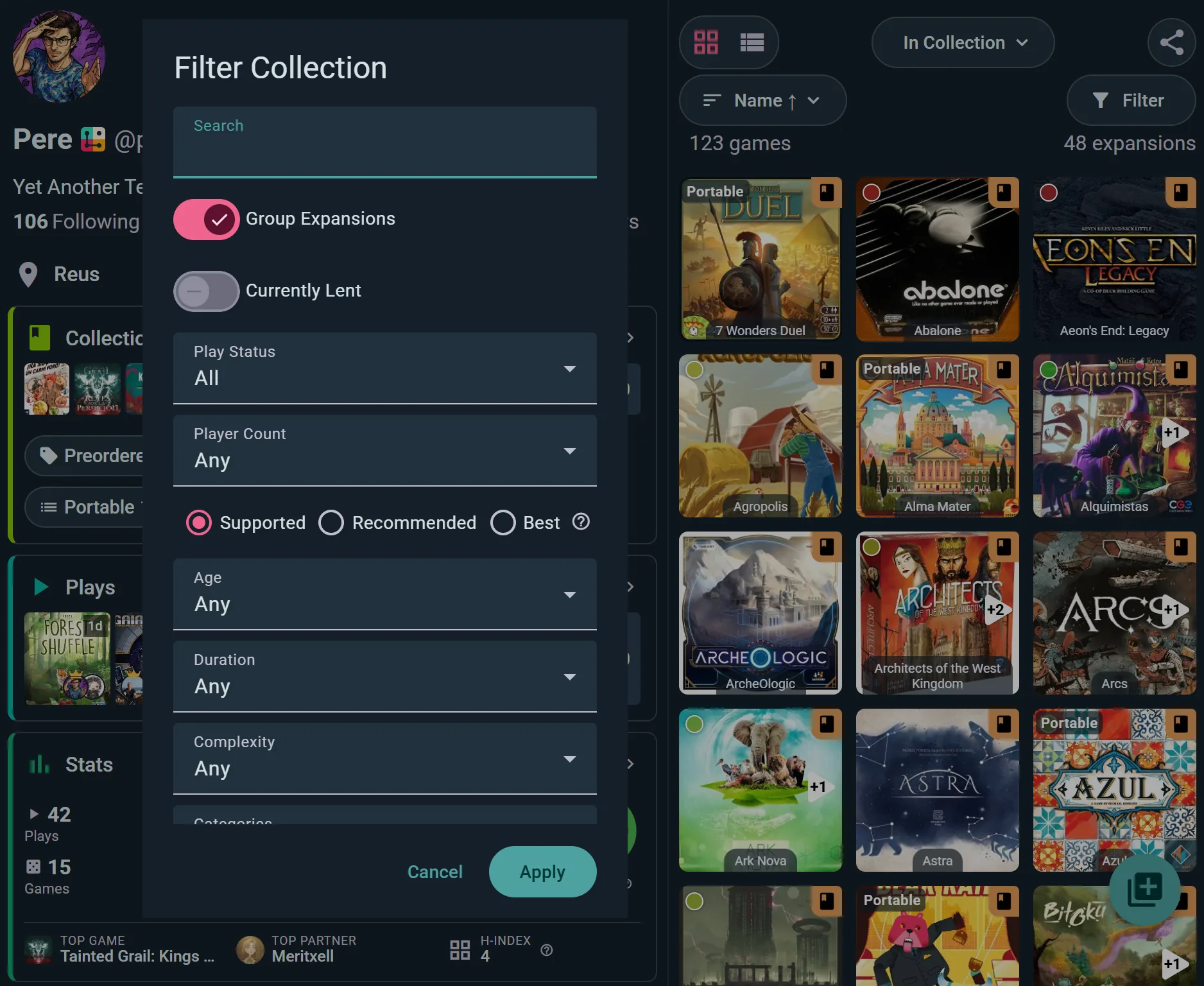
Start at the shelf: filter your collection by tonight’s player count — supported, recommended or best at — duration, age and complexity, and the debate is over before it starts.
- Best-at, not just fits. Five players can mean “works” or “shines” — the filter knows which.
- The group’s shelves count. A club night can browse everyone’s games, not just the host’s.
- Shelf of shame welcome. Filter to unplayed and finally deal with it.
- Still stuck? Deal me a game. First option in every game list: set players, a time and a weight to lean towards, and it deals cards from the table’s shelves until one gets a “This one!”.
Scheduling
A timeline of tables, not a wall of messages
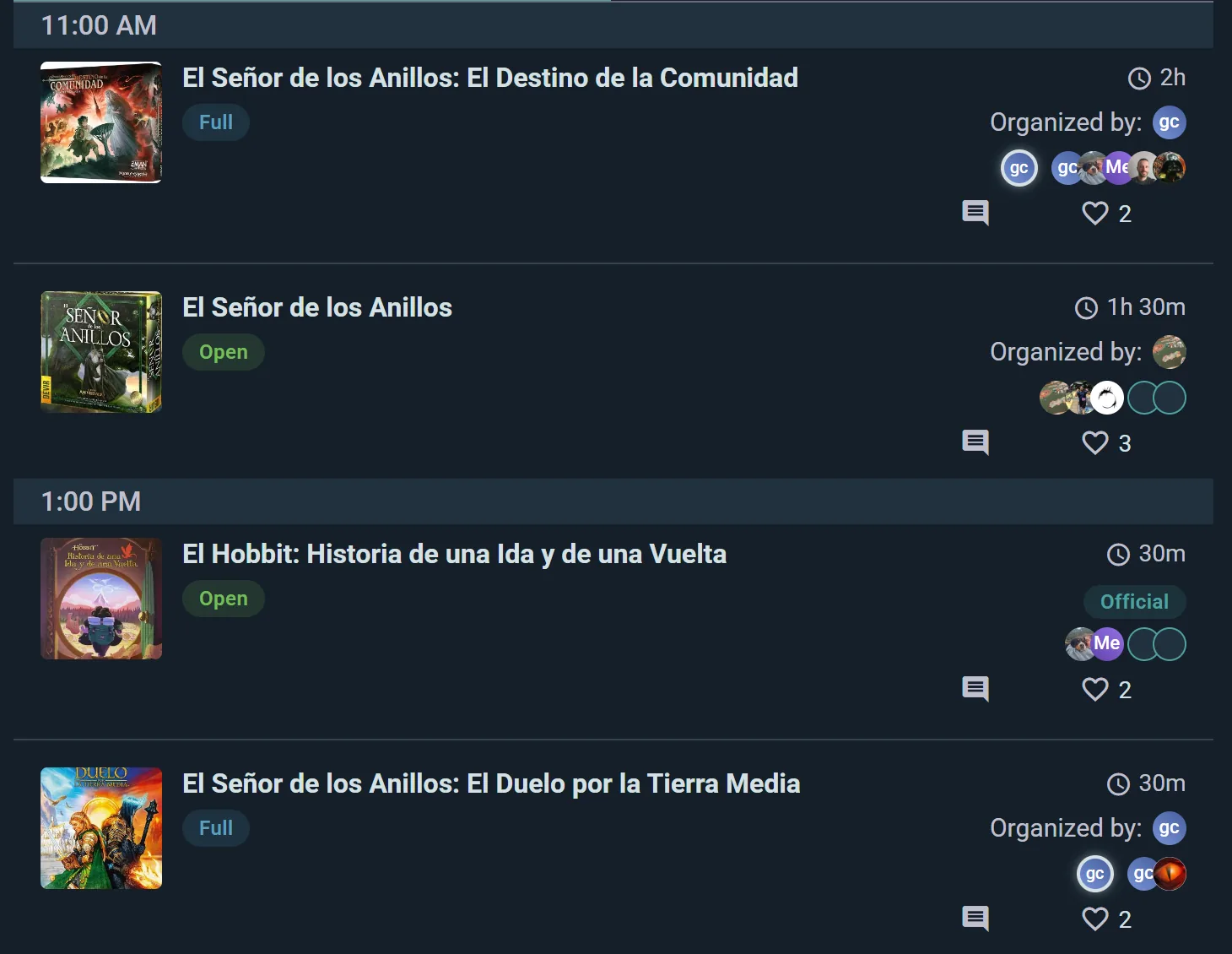
Give the night a schedule: each game gets a time, a duration and its own seats. Guests see the whole evening by the hour and pick the tables they want.
- Full and Open at a glance. Nobody writes “is there still room?” — the chip already answered.
- Real durations. A 30-minute filler and a 2-hour epic coexist on one timeline.
- One link does everything. The event page is invite, schedule and sign-up sheet; it opens in any browser.
Seats
Every table states its welcome
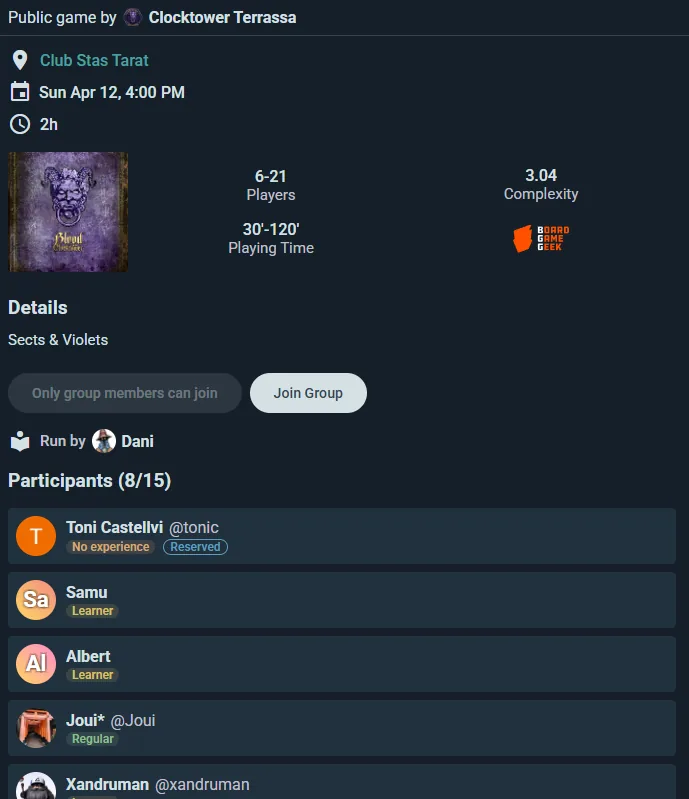
A scheduled game carries its seats, its waitlist and who runs it, and every player shows their experience with the game — so “never played” can see where they won’t be alone.
- Someone is teaching. “Run by Dani” means the rulebook is not the newcomer’s problem.
- Waitlists work alone. A cancellation promotes the next person — no reshuffling by hand.
- Experience tags. Learners and first-timers say so on their seat; a table of newcomers is easy to spot, and to give a teacher.
The finale
Score it on a sheet that does the maths
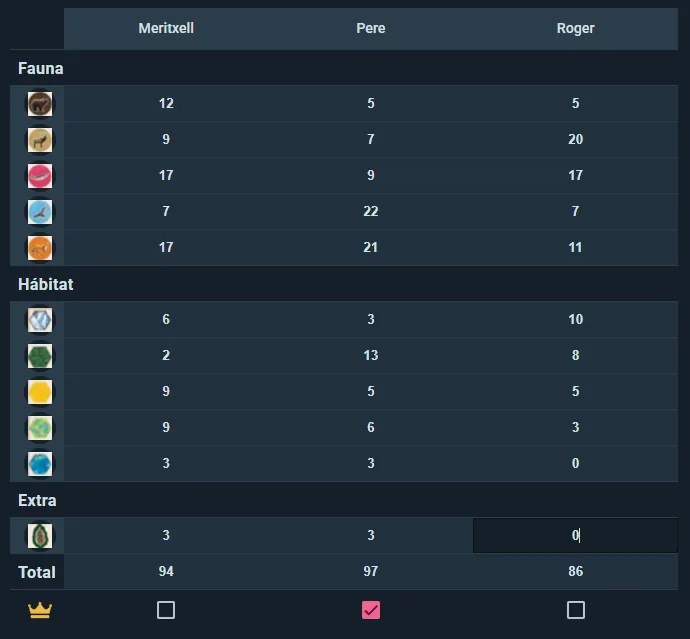
End the night on a game kit’s score sheet: every category itemised per player, totals computed live, winner crowned — then the play logs itself into everyone’s history.
- No 1am arithmetic. 94–97–86, category by category, added by the sheet, not by the tired person.
- It becomes the log. The finished sheet is a logged play in every player’s stats — nothing to re-enter.
- Kits carry setup too. Community-built kits include setup checklists for before the night starts.
Getting started
One night, planned in five minutes
Create the event
Date, place, visibility — private for the flat, public for the club. Share the one link.
Schedule the tables
Add games with times and seats; flag who teaches. Guests RSVP to the tables they want.
Play, score, done
The waitlist manages itself, the score sheet does the maths, and the plays land in everyone’s log.
Honestly
Against the group chat
The group chat can plan a game night. It just also plans everything else, forever, on top of it.
| The group chat | Ludoya | |
|---|---|---|
| Who is coming | Count thumbs-ups | RSVP list |
| What is being played | “Someone bring something” | Schedule with seats |
| Room at the table | “Still space??” | Full / open chips |
| Who teaches | Found out at the table | Flagged |
| Newcomer-friendly? | Hard to tell | Experience tags |
| The final scores | A napkin photo | A sheet that logs itself |
| Next morning | 47 unread | Plays in everyone’s stats |
What it costs
Nothing for the nights themselves — events, RSVPs, schedules, scheduled games, waitlists and score sheets are part of the free core.
Running nights for a whole club — recurring events, raffles, tournaments — is what the Club plan adds; selling tickets to a big one is Ludoya Tickets.
Friday deserves better than 47 unread messages
Make the event, schedule the tables, send one link.
Frequently Asked Questions
Does this work for a private night at home?
Yes — events have visibility settings, so a four-friends night at your flat is as valid as a fifty-person club session. Private events are invisible to everyone but the invited.
Do my friends need accounts to join?
The event link opens in any browser, and many events accept sign-ups without an account. Friends without accounts can also be added as named guests and appear in the plan and the logged plays.
How do waitlists actually behave?
Seats beyond capacity queue in order. When someone drops, the first queued person is promoted automatically and notified — the organiser does nothing.
Can people join just one game of the night?
Yes — RSVPs work per table, not only per event. Someone can come at 1pm for the 30-minute filler and skip the epic.
What if plans change mid-evening?
Edit the schedule live: move times, add a table, close seats. Attendees see the current state, because the link always shows the plan as it is now.
What are game kits?
Community-built companions for specific games: setup checklists and score sheets with the game’s real categories that total themselves. The finished sheet becomes the logged play.
Does the night feed our stats?
Yes — every logged play lands in each player’s history and win rates, and the event itself gets a stats page of what was played.