
For shops, cafés and game libraries
The venue players find, book and come back to
A profile on the map, tables booked from a phone with the games waiting on them, a library that lends itself out by QR, and events that sell their own tickets.
The room is already full
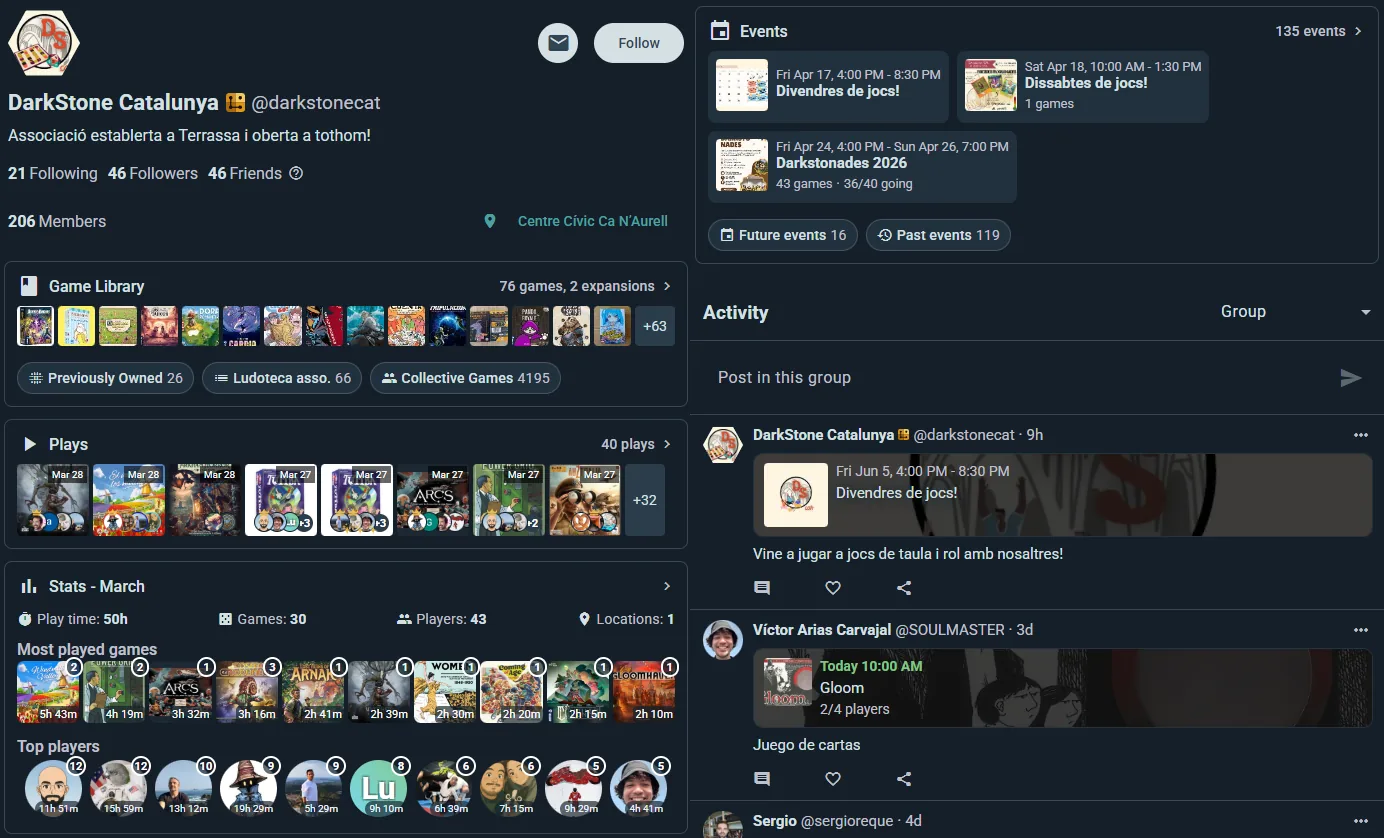
Your profile
On the map where players actually look
Location, hours, links and your upcoming events — a venue profile shows up in search and on the map for every player nearby, with a shared staff login behind it.
- A venue account, not someone’s personal one. Staff share access; the venue keeps its history when people move on.
- Followers hear from you. New events land in their feed and their notifications, not on a poster they walked past.
- Your shelf is public. Players can check you have Cascadia before they cross town for it.
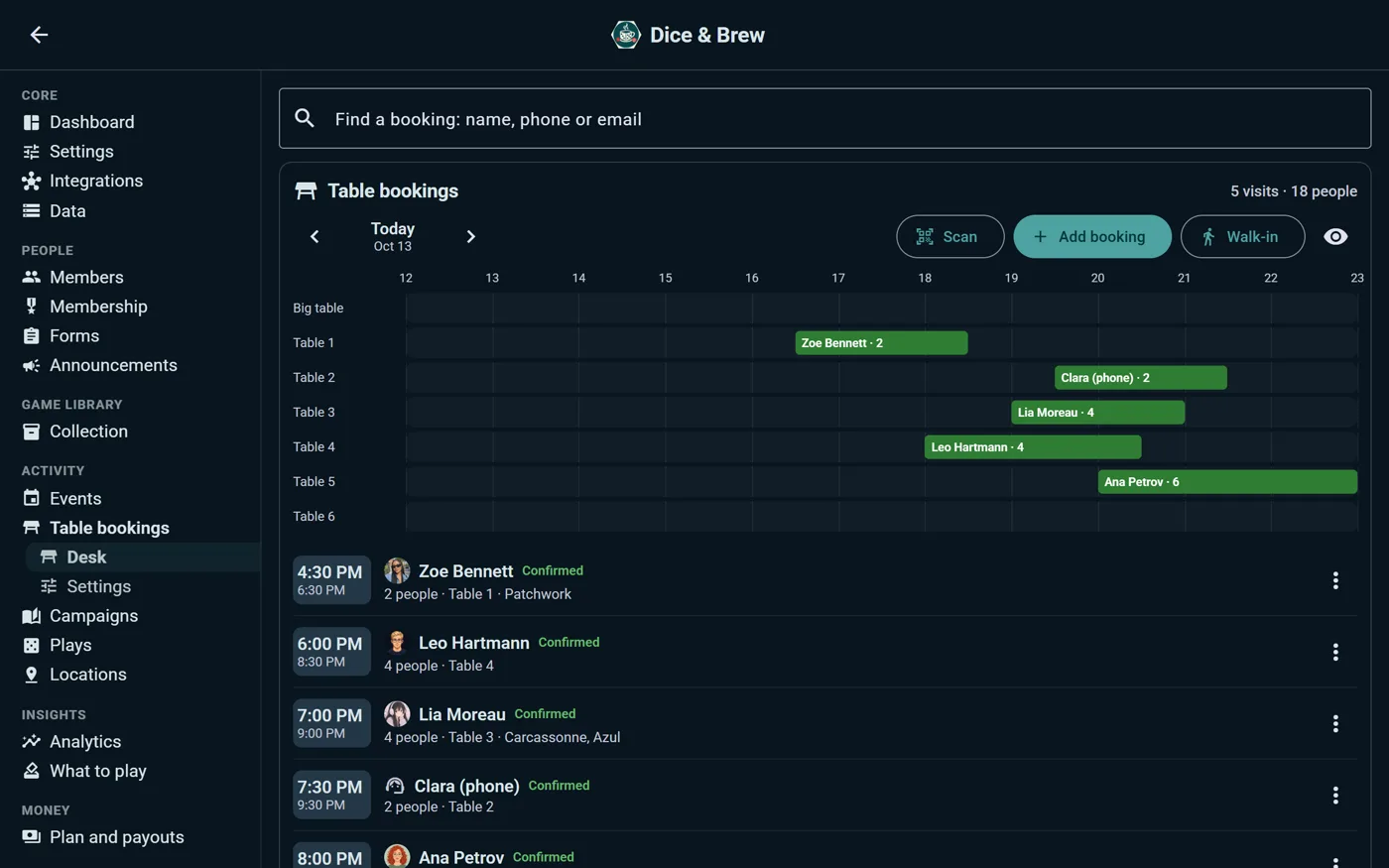
Table bookings
A table, a time and the games, booked before they walk in
Put “Book a visit” on your profile, or on your own website with one line of code. Players say how many they are and how long they stay, pick a time inside your opening hours, a free table on your floor plan and the games they want waiting. It lands on your desk with the games to set aside.
- A table is never booked twice. Keep some tables for walk-ins, leave a few minutes between visits to clear them, and an event on a room keeps its tables busy.
- The games are waiting. Visitors pick a few from your shelf; for that visit, those copies are not offered to anyone else, and nobody can borrow them.
- One desk for the whole day. Phone bookings and walk-ins typed in at the counter, requests confirmed by hand if you prefer, and a note on anyone who has not turned up before.
- A pass at the door, account or not. Guests book with a name and an email and get a link to move or cancel. Once you say yes, a QR pass and a reminder three hours before; your staff scan it and the table is theirs.
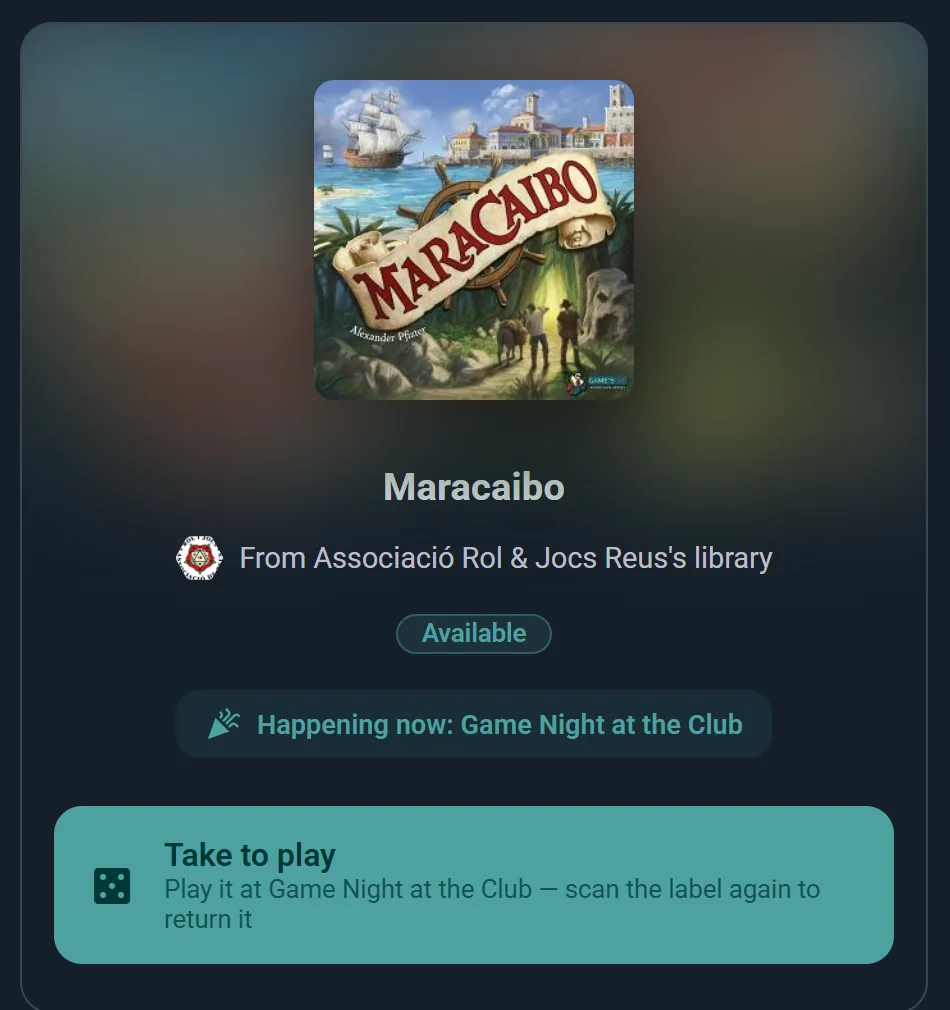
The lending library
Two ways to lend, and neither one is a clipboard
An unattended shelf wants a QR label on every box, so members borrow and return without asking anyone. A staffed counter wants the opposite: nothing on the boxes at all, and a code on the visitor’s phone that your desk scans as the game changes hands.
- Labels, for a shelf nobody mans. One sticker per copy, printed from Ludoya. Members scan to borrow and scan to return.
- A desk, for a counter you do man. Nothing printed, nothing stuck on a box. The visitor reserves from their phone, shows a code that expires in five minutes, and your staff scan it as they hand the game over.
- Loans that fit the game. One length for the whole shelf, or a length taken from each game’s own playing time, so a filler comes back long before a four-hour epic has to.
- Either way, the log is the same. Who has what, since when, and what is overdue — not a discovery you make at closing time.
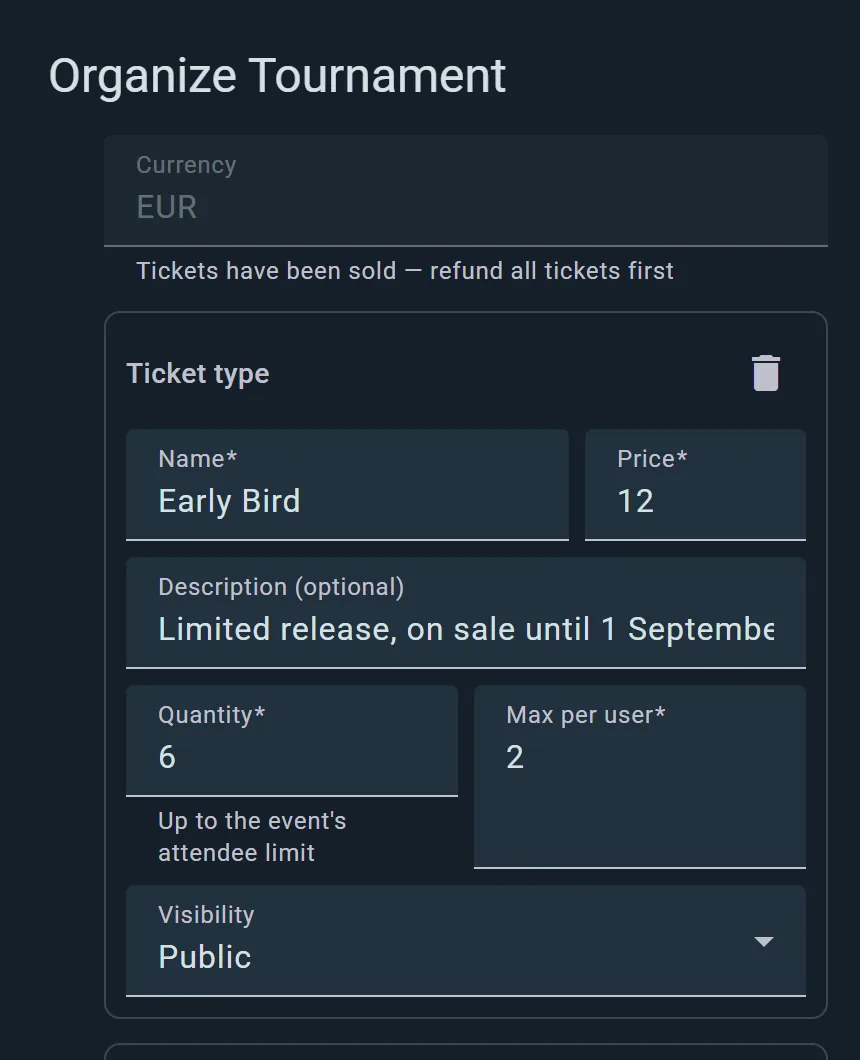
Paid events
Tickets sold, seats counted, money in your account
Connect Stripe once. Ticket types, prices and refunds are yours to define; payouts arrive on their own, and cash at the door can be logged next to it all.
- Card or cash. Online sales through Stripe, walk-ins recorded by hand — one attendee list.
- Refunds without email chains. Issue them from the sales panel; the seat goes back on sale.
- QR at the door. Every ticket is a code; entry is a scan, not a name hunt on a printout.
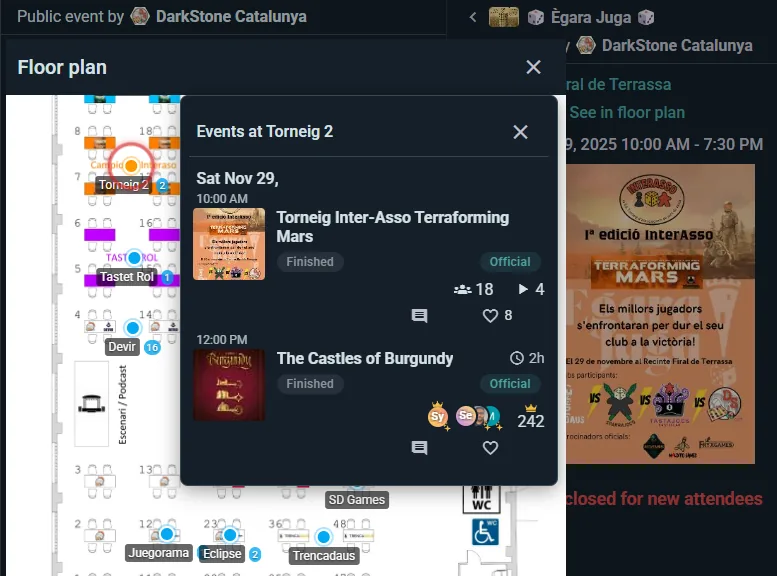
The room itself
Your floor plan, live
Draw the rooms and tables once. Events assign people to them, capacities hold, and on the night everyone knows where table 7 is — including you.
- Tables with capacities. A six-seater takes six. The system, unlike the door, says no politely.
- Named spots. “The window table” means the same thing to the app and your regulars.
- Drawn once, used everywhere. Every future event inherits the plan, and visitors booking a table pick theirs on it.
The professional layer
Built for a venue, not adapted to one
What a venue gets, every item shipped and documented. Forms of up to five questions and the attendee export are free; the public API and the WordPress plugin come with Club; the rest is Business.
QR entry verification
Scan at the door, spot duplicates and no-shows in real time.
Custom registration forms
Ask what you need at sign-up — meal choice, age bracket, team name.
Attendee export
The full list as a file, for the insurer, the caterer or your own records.
Demo stand timetable
Demo tables at set times — players book a seat at a game, not just a ticket.
Auto open and close
Registrations open and close themselves on the schedule you set.
Public API
Your events and collection on your own website, kept current automatically.
Every address you run
A second shop or a back room across the street: each on your profile with its own opening hours. Players already added one? Claim it.
A Bring & Buy that brings people back
Sell your customers’ used games at your till and pay them in store credit worth a bonus on top.
A WordPress plugin
Your events, sign-up, shelf and stats on your own WordPress site, managed from wp-admin.
Getting started
Open on Ludoya this week
Create the venue account
Name, address, hours, links. You appear on the map immediately — no review queue.
Publish something joinable
A games night, a learn-to-play, a tournament. Share one link; players nearby also find it on their own.
Add the layers you need
Table bookings when the room fills up, the lending library when the shelf matters, Stripe when events go paid.
Honestly
Against the clipboard and the generic booking tool
Generic tools do bookings. None of them know what a board game is.
| Clipboard + generic tools | Ludoya | |
|---|---|---|
| Players discover you | Foot traffic | Map, search, feed |
| Table bookings | Phone and a notebook | Online, on your floor plan |
| Lending library | A notebook | QR per copy |
| Ticketing | Second platform | Built in |
| Door control | Paper list | QR scan |
| Tables and capacity | In your head | Floor plan |
| Tournaments | — | Four formats |
| Your catalogue online | Your own website | Profile + API |
| Cost to start | Varies | Free |
What it costs
The venue profile, your events, your followers and your community cost nothing.
The Business plan is the professional layer: table bookings, QR entry verification, interactive floor plans, auto open/close, a second-hand market at your events, the event on a big screen and the public API without a daily cap. Registration forms and the attendee export are free. Free forms take up to five questions; Club removes the limit. Ludoya Tickets charges a small per-ticket fee only when you actually sell. QR labels on every copy of your library come with the Club plan, which Business includes.
A club without a till is better served by the clubs page and the cheaper Club plan. Prices for everything are public on the pricing page.
Put your venue where the players are
The profile is free and takes minutes. The players in your city are already in the app.
Frequently Asked Questions
Someone already added our shop to Ludoya. Is it ours now?
It can be. Every public place exists once on Ludoya, so a venue players added is the same one you would have created. Claim it from your console: say how you are related to the address, Ludoya staff check it, and once approved your opening hours become the venue’s and you look after its address, spots and floor plan. Players keep using it for their events and plays as before.
What does it cost to be listed?
Nothing. The venue profile, events, followers and community features are free, and so are registration forms and the attendee export. The Business plan covers the professional layer — table bookings, QR entry, floor plans, copy labels and the lending desk, the uncapped API — and tickets carry a small fee only when sold. Free forms take up to five questions; Club removes the limit.
We are a game library, not a shop. Does this fit?
Yes — shops, cafés, game libraries, associations with a venue, even a bar with a games shelf. The features are about having a room, a shelf and events, not about retail.
How do payouts work for paid events?
Through Stripe, connected to your own account. Ticket revenue settles to you automatically; refunds are issued from the sales panel and the seat returns to sale.
Can customers see which games we have in?
Yes. Your library is browsable on your profile, per copy. Players routinely check a venue has the game before making the trip.
What if someone walks in without a ticket?
Register them at the door — cash entries sit in the same attendee list as online sales, so your numbers stay whole.
Can players book a table, and pick the games?
Yes, on the Business plan. From your profile or your own website, visitors choose a time inside your opening hours, a free table (on your floor plan, if you drew one) and a few games you keep aside for them. You can confirm each request by hand or let them through; a request nobody answered is declined before the visit, never left hanging.
How does the lending actually work on the night?
Each copy carries a printed QR. A member scans it to borrow and scans again to return; you see who has what live, and the history per copy afterwards.
Can our website show our events automatically?
Yes — the public API serves your events, collection and stats as JSON, and there is a WordPress plugin if that is what your site runs.
Do we need every customer to have the app?
No. Event links open in any browser and many events accept sign-ups without an account. The app is where regulars end up, not a requirement at the door.