
The Public API gives organization admins direct HTTP access to your organization's live data — pull it into any website, app, bot, or automation that can make an HTTP request. It's a Club plan feature.
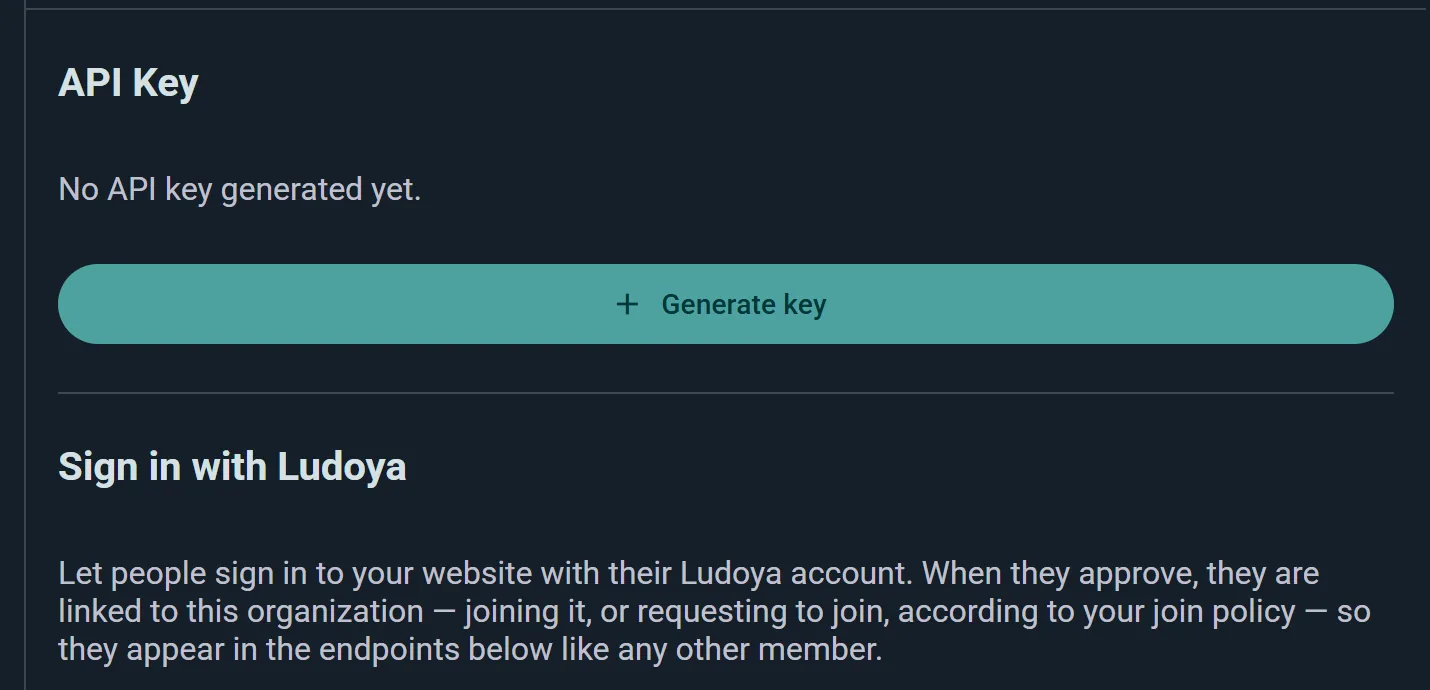
The key is scoped to your organization — all endpoints operate on that group automatically. Base URL: https://api.ludoya.com/public/v1. Auth header: X-Api-Key: YOUR_KEY. Rate limits depend on your plan: Club keys allow 30 requests per minute and 2,000 per day, Business keys 100 per minute with no daily cap. Past either, you'll get a 429 with a Retry-After header.
Running WordPress? You don't need to touch the API at all: the free Ludoya plugin lists your events on your own site and lets you create and edit them from the WordPress admin, using the same key.
Keys start with ldy_ and are 36 characters long, so they're easy to spot in a config file — and easy to scan for if one ever ends up somewhere it shouldn't. Treat it like a password: server-side only, and revoke it from the same page if it leaks.
What You Can Access
- Locations — your group's available venues and their spots; used as input when creating events
- Events (read) — upcoming and past events with title, description, date/time, timezone, capacity, participant count, and status
- Events (write) — create and update events via POST and PUT, with full control over location, capacity, permissions, visibility, and image
- Sub-events — list the events nested inside a parent event
- Participants — add someone to an event, change their attendance, or remove them
- Members — member list with user profiles and roles (Owner, Admin, Member), paginated
- Invites — invite someone into your group
- Search — look up Ludoya users and the board game catalog, so you can resolve names to IDs before writing
- Collection — game collection with filtering by ownership, name, player count, and list; sortable and paginated; each game includes BGG metadata
- Stats — play statistics for any time period: totals, averages, top players with wins and scores, per-player-count breakdowns, per-location, and per-game
- Campaigns (read) — list the group's campaigns with member and session counts; retrieve full campaign detail including members, past sessions, and scheduled events
- Campaigns (write) — create campaigns for the group and update their name, description, status, and visibility
- Campaign members — add, update, and remove the people in a campaign
Endpoints
GET /locations
Returns the group's available locations. Each location has an id, name, optional address, capacity, an isDefault flag, and a spots array (each spot has its own id, name, and capacity). Use location and spot IDs when creating events.
Sign in with Ludoya
The same page that holds your API key also turns your organization into a sign-in provider. Let people log into your own website, forum, or community platform with their Ludoya account — no separate password for them to forget, and no user database for you to run.
Why It's Worth It
When someone approves the sign-in, they're linked to your organization: depending on your group's join policy they either become a member straight away (open), file a join request for an admin to approve (request to join), or simply sign in without joining (invite only). Either way they show up in the /members endpoint like anyone else — so your website's login and your Ludoya member list stay in step automatically.
Setting It Up
It's standard OpenID Connect, so most platforms need nothing but an issuer URL plus a client ID and secret. Register your application from the Public API page to get those credentials, and list the redirect URIs your site will use — you can register several, and each must match the redirect_uri your site sends character for character, trailing slash included. A near-miss is the single most common reason a first sign-in attempt fails.
- Discourse — install the OpenID Connect plugin, paste the discovery URL, add the credentials
- WordPress — any generic OpenID Connect plugin, using its "auto discover" option
- Anything else — if it speaks OIDC, point it at the issuer URL and it configures itself
Each sign-in returns the person's permanent identifier, their username, display name and avatar, and their email. Full setup instructions, including the by-hand flow, live in the in-app developer guide at Developers → Sign in with Ludoya.
For the People Signing In
Anyone who has used Ludoya to sign in somewhere can review those connections under Settings → Connected apps, see when each was connected and last used, and disconnect any of them at any time. Disconnecting cuts the site's access immediately but doesn't remove them from your group.
GET /events
Returns future and past events in separate paginated lists.
| Param | Type | Default | Description |
|---|---|---|---|
onlyFuture |
boolean | true |
Set false to also return past events |
Each event includes: type (MEETUP or PLANNED_PLAY), title, description, startsAt, endsAt, timeZone, imageUrl, capacity, participantCount, canceled, teacher (user object or null), master (user object or null). User objects contain id, username, name, avatarUrl.
POST /events
Creates an event in the group. Required fields: type and title. If locationId is omitted, the group's default location is used; if none exists, returns 400.
Optional fields include: description, locationId, spotId, gameId, parentEventId (for sub-events), startsAt, endsAt, restrictedAttendance, capacity, minParticipants, estimatedDurationMinutes, maxReservationsPerUser, takeGamesPermission, organizePlaysPermission, teacherUserId, masterUserId, visibility, image.
The image field accepts either {"base64": "data:image/jpeg;base64,..."} or {"url": "https://..."}. Max 5 MB.
Returns {"id": "string"} with status 201.
PUT /events/{eventId}
Updates an existing event. Same body shape as POST — only include the fields you want to change. The caller must be the event organizer (the group account). Returns 202 with empty body.
GET /events/{eventId}
Fetches a single event by id, with the same shape as the entries in GET /events.
GET /events/{eventId}/children
Lists the sub-events nested inside a parent event — the individual tracks or sessions of a larger gathering. Each child has the same shape as a regular event.
Managing Participants
Three endpoints let you run an event's attendee list from outside Ludoya — handy if sign-ups happen on your own website, or you're importing an existing list.
| Method | Path | What it does |
|---|---|---|
POST |
/events/{eventId}/participants |
Add someone to the event |
PUT |
/events/{eventId}/participants/{userId} |
Change their attendance status |
DELETE |
/events/{eventId}/participants/{userId} |
Remove them from the event |
Adding someone who isn't on Ludoya. The POST body takes either a userId for an existing account, or a name and email — the two are alternatives, not to be combined. The name-and-email route mints (or reuses) the account behind that address, exactly like the quick sign-up in the app, so the person can claim it later. That's what makes this endpoint genuinely useful: someone fills in the form on your own website, never having heard of Ludoya, and still turns up on your attendee list.
If your event has a custom form, you can send their answers too, as formAnswers keyed by question id.
Use GET /search/users to turn a username into the userId the PUT and DELETE paths expect.
More Endpoints
The rest of the API, in short. The API Reference on the Public API page lists every endpoint with all its fields, and the same contract is published as /public/v1/openapi.json, and as /public/v1/llms.txt for an AI assistant writing your integration. Copy instructions for your AI assistant, on the same page, gives it the whole API in one paste, without your key.
For AI agents: MCP. An assistant that speaks the Model Context Protocol connects straight to /public/v1/mcp with the same key, and can only read. /public/v1/mcp/write offers the tools that change things too, so whether an agent may write is decided by the address you give it.
- Publishing, cancelling, deleting.
POST /events/{eventId}/publishputs a draft event live, its sub-events included;/unpublishand/canceldo what they say, andDELETE /events/{eventId}removes it. - Who signs up, and how. On
POST /events/{eventId}/participants,attending: falsekeeps someone's form answers and guests without giving them a seat, andconsent: truesays they agreed on your own form to a Ludoya account, so the account e-mail reads as a welcome rather than a note to a stranger. - Guests.
POST /events/{eventId}/participants/{userId}/guestsadds a companion by name, with no account, plus their answers to the form's per-guest questions. - Forms.
/form-templateskeeps reusable sign-up forms;PUT /events/{eventId}/formpoints an event at a template, or gives it questions of its own. Editing a template reaches every event that follows it. - Your own e-mails. Send
notify: falsewhen you sign someone up and Ludoya sends them nothing: you mail them from your own address. Later mails about your events (a seat opening, the event changing) are held for you atGET /mail,POST /mail/acknowledgemarks them sent, and/webhookregisters an HTTPS address that gets a signed call whenever one arrives. Once the person claims their account, Ludoya writes to them itself.
GET /members
Returns a paginated member list.
| Param | Type | Default |
|---|---|---|
pagination.size |
int | 50 |
pagination.offset |
int | 0 |
Each member includes: id, username, name, avatarUrl, role (OWNER, ADMIN, or MEMBER).
POST /members/invite
Invites someone into your group. This one takes a username directly — no id lookup needed — so you can onboard members straight from your own site or admin tool.
GET /search/users and GET /search/boardgames
The two lookup endpoints. Most write operations want an id rather than a name, and these are how you get one.
GET /search/users
| Param | Type | Default |
|---|---|---|
query |
string | required |
intent |
string | — |
pagination.size |
int | 20 |
pagination.offset |
int | 0 |
GET /search/boardgames
| Param | Type | Default |
|---|---|---|
query |
string | required |
filter |
string | — |
pagination.size |
int | 50 |
pagination.offset |
int | 0 |
The board game filter takes the same semicolon-separated key=value form as the collection filter, so you can search the catalog by player count, play time, complexity, year, age, or tags.
GET /collection
Returns your game collection with filtering, sorting, and pagination.
| Param | Type | Default | Description |
|---|---|---|---|
filter |
string | — | Semicolon-separated key=value pairs. Keys: ownership (OWNED, PREVIOUSLY_OWNED, PREORDERED, WISHLISTED), played (boolean), listId, nameFilter, playerCountFilterType (OFFICIAL, GOOD, BEST), playerCountFilter (number) |
groupExpansions |
boolean | true |
Group expansions under their base game |
sort |
string | — | Format: property,direction — e.g. name,asc |
pagination |
string | — | Format: size,pageIndex — e.g. 20,0 |
Response: totalGames, totalExpansions, games[] — each with: id, slug, name, imageUrl, isExpansion, yearPublished, minPlayerCount, maxPlayerCount.
GET /stats
Returns play statistics for a configurable time window.
| Param | Type | Default | Description |
|---|---|---|---|
period |
string | ALL_TIME | Format: PERIOD,date,index. Values: ALL_TIME, ONE_YEAR, ONE_MONTH, THIRTY_DAYS, SEVEN_DAYS, ONE_DAY, CUSTOM. The index shifts the window back (0 = current, 1 = previous). Custom: CUSTOM,startDate,0,endDate |
Response includes:
- Summary — total plays, total/average play time, unique game, player, and location counts
- By player — per-person plays, wins, average and best score
- By player count — breakdown of 2-player, 3-player, 4-player games, etc.
- By location — play count and unique games per venue
- By game — play count, total/average play time, and unique players per title
GET /campaigns
Returns a paginated list of campaigns belonging to the group.
| Param | Type | Default | Description |
|---|---|---|---|
status |
string | — | Filter by status: ACTIVE, COMPLETED, or ARCHIVED |
pagination.size |
int | 50 | Items per page |
pagination.offset |
int | 0 | Offset |
Each campaign includes: id, game (id, name, imageUrl), name, image, status, visibility, createdAt, updatedAt, memberCount, sessionCount.
GET /campaigns/{campaignId}
Returns the full detail of a campaign belonging to the group.
Response includes: All list fields, plus template, description, globalNotes, globalState, members[] (each with user, role, characterNotes, characterState), sessions[], and events[].
POST /campaigns
Creates a campaign for the group. Required fields: gameId and name. Visibility defaults to group-members-only (ONLY_GROUP) if omitted.
Optional fields: templateId, description, visibility (PUBLIC, ONLY_GROUP, ONLY_FRIENDS, or PRIVATE).
Returns {"id": "string"} with status 201.
PUT /campaigns/{campaignId}
Updates an existing campaign. All fields are optional — only include what you want to change.
Optional fields: name, description, status (ACTIVE, COMPLETED, ARCHIVED), visibility.
Returns 202 with empty body.
Campaign Members
Manage who's in a campaign, the same way you manage event participants.
| Method | Path | What it does |
|---|---|---|
POST |
/campaigns/{id}/members |
Add someone to the campaign |
PUT |
/campaigns/{id}/members/{userId} |
Update their membership |
DELETE |
/campaigns/{id}/members/{userId} |
Remove them |
Error Codes
| Status | When |
|---|---|
| 400 | Validation failure (missing required field, no location found, invalid image) |
| 401 | Missing or invalid API key |
| 403 | Action not permitted or group not on Club plan or above |
| 404 | Resource not found |
| 429 | Rate limit exceeded |
Getting Started
1. Generate an API Key
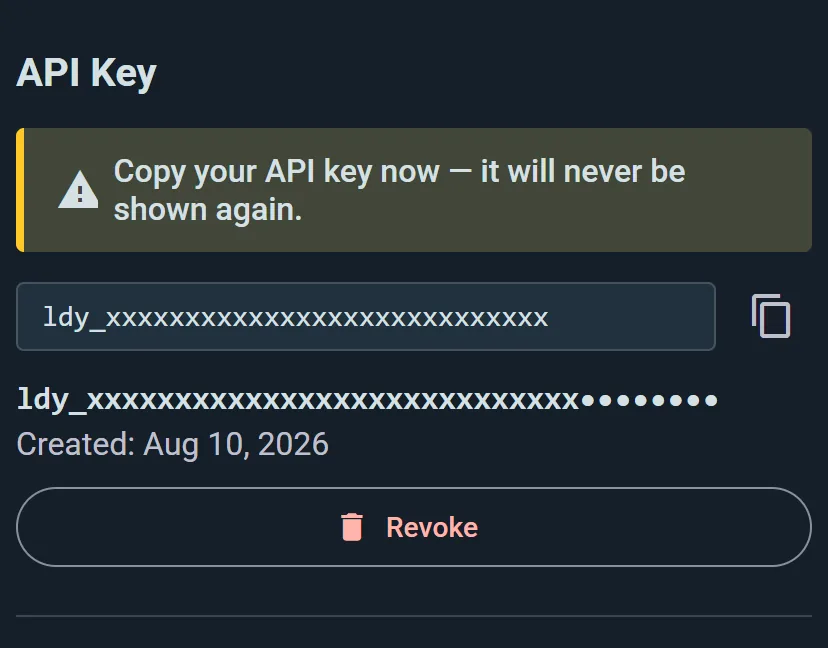
- Go to your organization's profile page and tap the menu (⋮) → Public API, or open the console's Integrations and choose Keys and apps
- Tap Generate key
- Copy your key immediately — it is shown only once and cannot be retrieved again
The key is tied to your organization. Keep it secret: anyone with the key can read and write all of the data above.
2. Revoke or Regenerate
To revoke an existing key, go back to the Public API page and tap Revoke. Confirm the dialog. Any system using the old key will immediately start receiving 401 errors. To issue a new key, tap Generate key again.
See also:
- Organizations — organization accounts and premium features
- Premium — Club and Business plan pricing
- Integrations — other ways to connect Ludoya with external tools