
Everything you can look for on Ludoya lives in one place: Explore. Games, people, communities, events, listings — one screen, one search bar, five tabs.
The Explore Screen
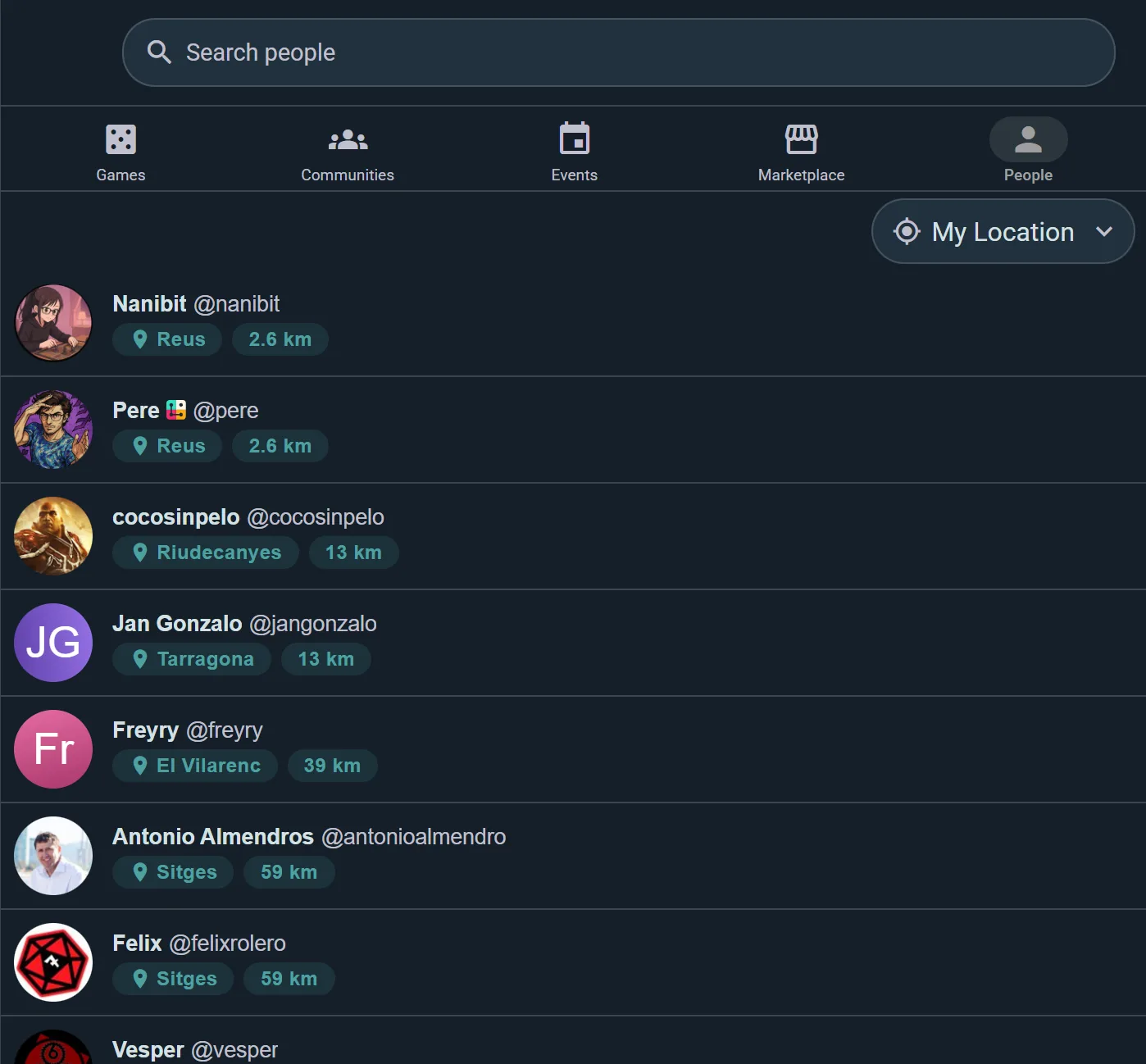
Pick a tab, and the search bar and filters reshape themselves around it:
- Games — the board game catalog
- People — find players by name or username, each with how alike your tastes are once you have both set your taste in games
- Communities — gaming groups, clubs, shops, and venues
- Events — upcoming events near you
- Marketplace — second-hand listings
Each tab searches its own kind of thing, so a game search never buries you in unrelated profiles. Ludoya remembers which tab you were last on and opens there next time.
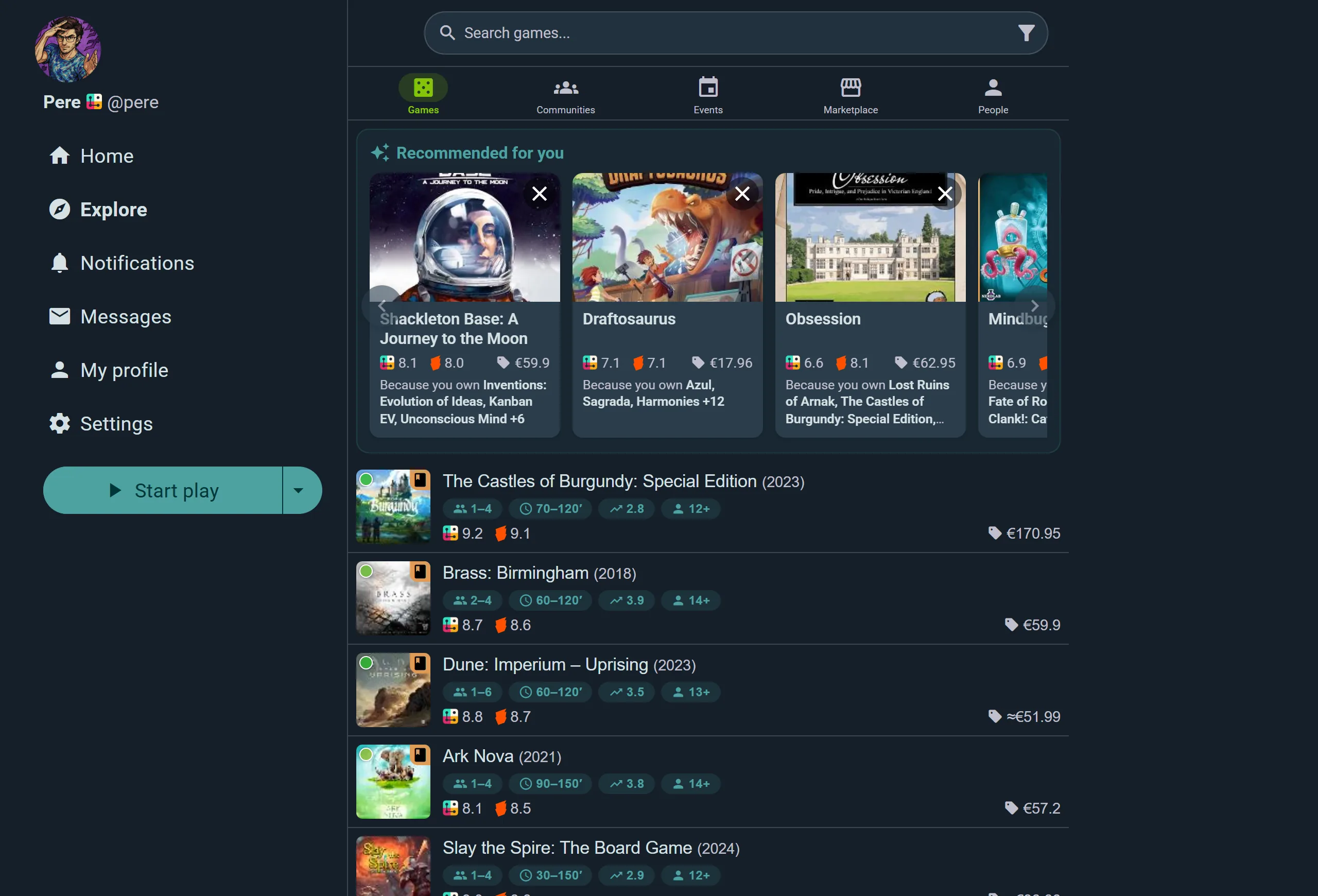
The Games tab opens with Recommended for you — picks drawn from what's already in your collection, each one saying which of your games prompted it. New to Ludoya, with nothing in your collection yet? You get Great first games instead. Then come two more rows:
- Hot right now in Ludoya: what people here are playing this week
- Crowdfunding now: live campaigns from Gamefound, Kickstarter and Verkami, with how much each has raised, how many backers it has and, when the game is already in the catalog, its rating
The rows step aside while you search or filter. Below them, every result carries player count, play time, complexity, age, both ratings and the current best price at a glance.
Filters are a row of chips under the search bar, on every tab: one chip per criterion, picks apply at once, the ones you've set move to the front, and Clear all appears once two are set. The sort is a chip too. On Events that means distance, day of the week, open seats, audience, style, language and more; on Communities, distance, size, what's open at a given time and membership; on Marketplace, ships to me, listing type, price, condition and distance.
Recent Searches
Your recent searches appear in a dropdown under the search bar, kept per tab — your game searches don't clutter the People tab. They're stored on your device only and never sent to our servers.
Location-Aware Tabs
Communities, Events, and Marketplace all understand where. Set your city, adjust the distance, and results follow. Communities and Events can also be viewed as a map with clustered markers and a Search in this area button so you can drag the map to a neighborhood and search exactly there.
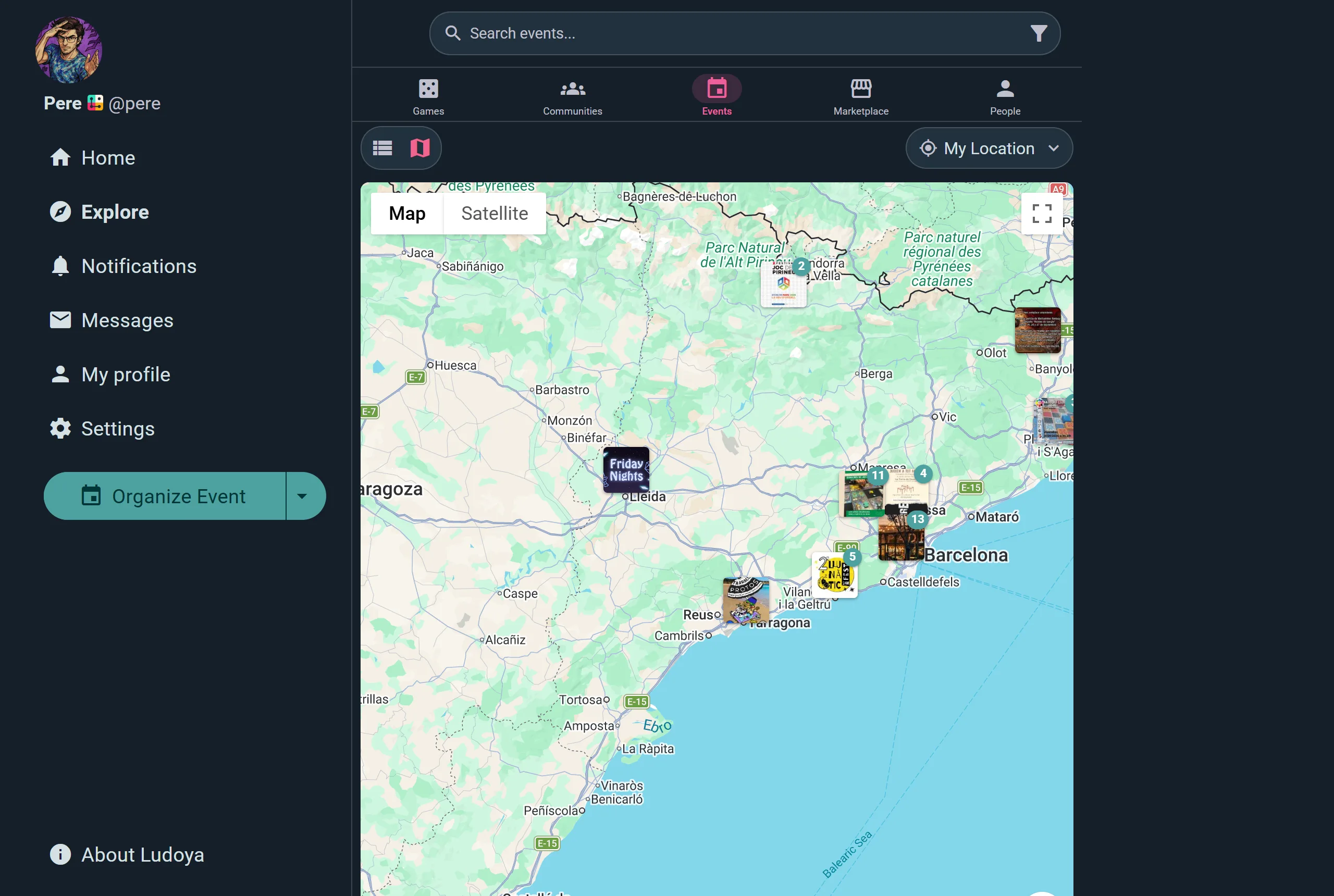
Markers carry the event's own artwork, and a number when several sit close together — so a busy city reads as a handful of clusters rather than a pile of overlapping pins. Tap the city name at the top to move the search anywhere.
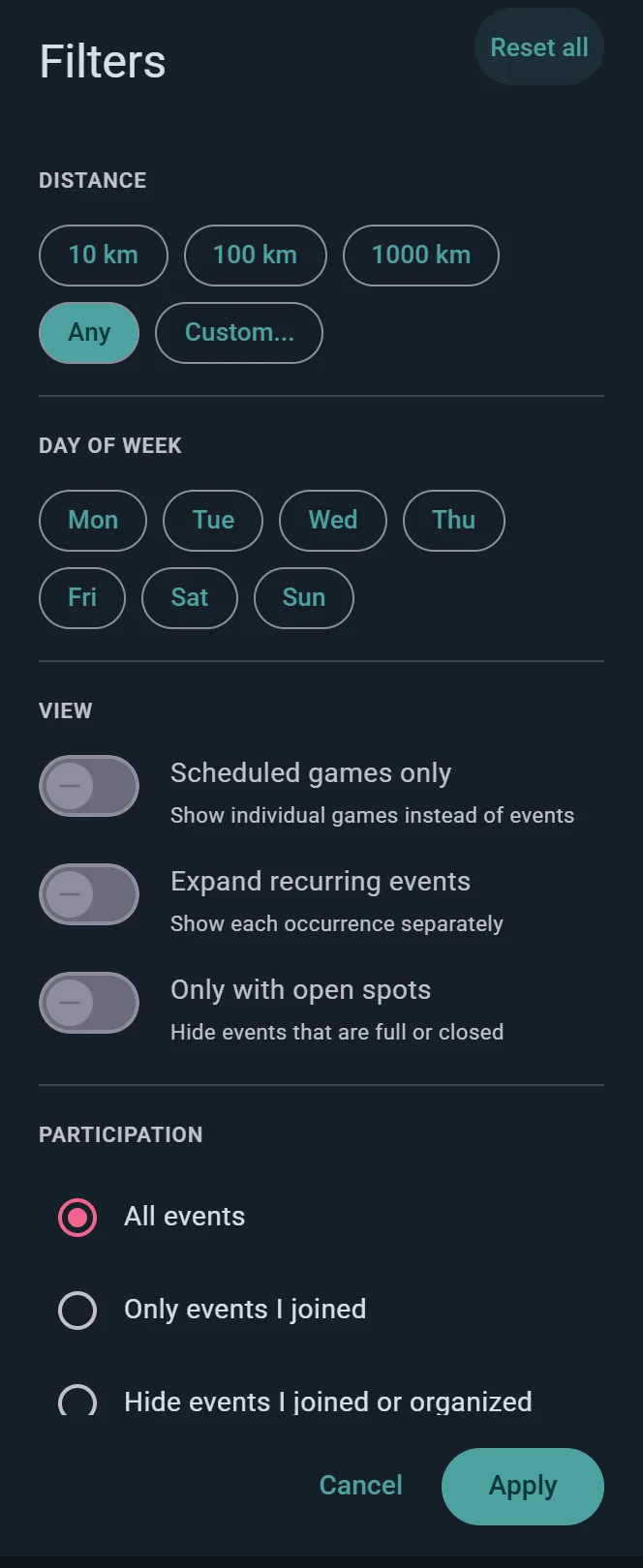
On Events, the chips go further than where and when: Scheduled games only lists individual tables instead of whole events, Expand recurring events shows each occurrence separately, Only with open seats hides anything full or closed, and Participation chooses between everything, Only events I joined, or Hide events I joined or organized. Communities have the same choice for the ones you're in.
Shareable Links
Explore keeps your search text and game tag filters in the page URL, so a link you copy reproduces that search for whoever you send it to.
Game Search & Filters
Games are searchable and filterable across the platform. Use these tools to narrow your search:
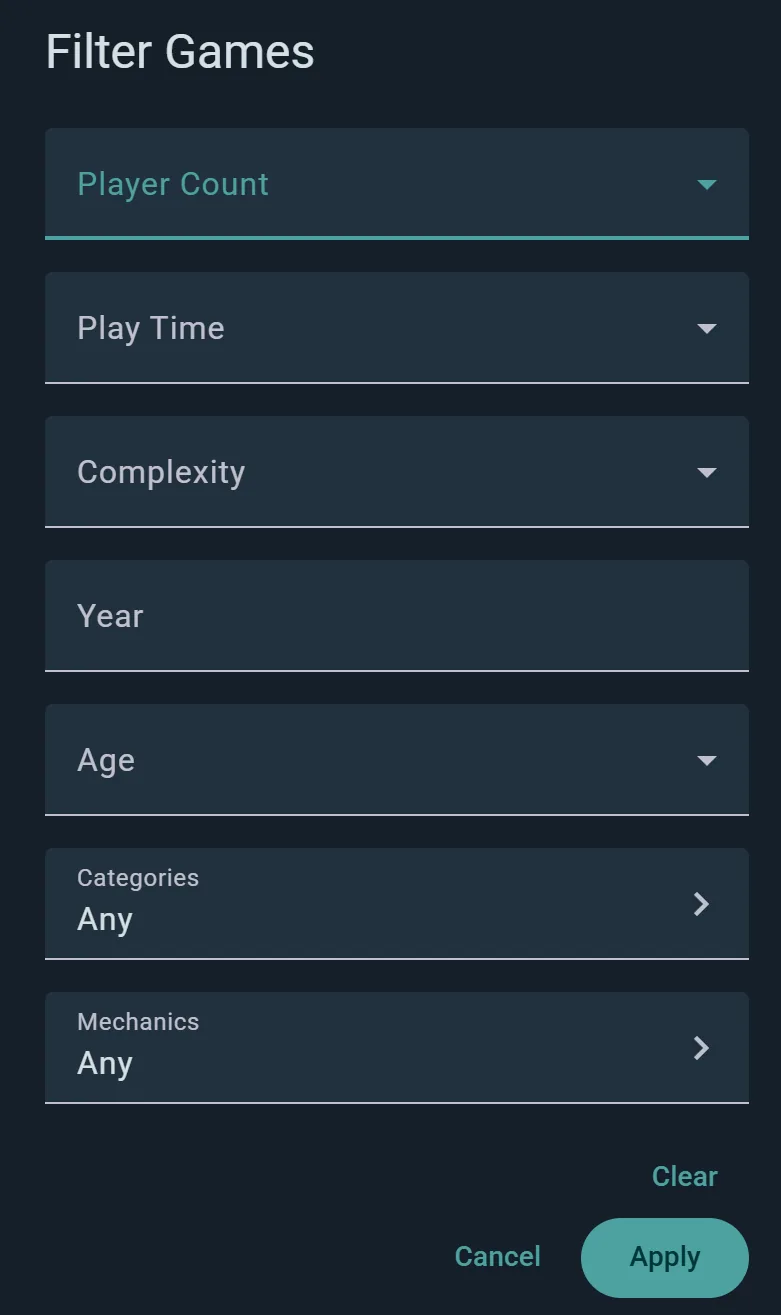
Player Count
Find games that match your table size:
- Solo — 1 player games
- 2 through 8+ — Specific player counts
- Results show games that officially support your selected count
Play Time
Pick a limit rather than fiddling with minutes: Under 20', Under 45', Under 1h, Under 2h, or Long for anything past two hours.
Complexity
Choose games that match your group's experience level: Light, Medium, Heavy or Very Heavy. The bands overlap a little, so a game on the border between two shows up under both.
Year
Enter a publication year to find games from a specific vintage.
Age
Filter by who the box is for: Young kids (3–5), Kids (5–7), Family (8–10), Teens (11–13) or Adults (14+). The bands follow the ages printed on boxes, so asking for teens no longer brings back every kids' game.
Categories & Mechanics
The real discovery tools. Open the Categories or Mechanics picker and select as many as you like — worker placement, deck building, co-op, legacy, party, whatever you're in the mood for. Your selections appear as removable chips above the results, and they ride along in the page URL, so a link to "co-op deck builders" is something you can actually send to a friend.
Ownership at a Glance
Results show which games are already in your collection, so you can spot what you own while browsing.
Can't Find Your Game?
If a game isn't in the catalog yet, the "Can't find your game?" option in the add-a-game and play-logging flows lets you submit it. Submissions go through moderation review to keep the catalog reliable, and you're notified when yours is reviewed. Adding and correcting catalog entries is a Player plan feature.
Version Selection
When you add a game to your collection or create a play log entry:
- Search for the game
- If multiple editions/versions exist, you'll see them listed
- Select the version that matches your copy (base game, special edition, etc.)
- Confirm and proceed
Describe the Game You Want
Don't know the name? Type what you're after in the Games search, the way you'd say it: "game for my 7 year old with farm animals", "something for two we can play in 20 minutes", "racing game with cards". When no title matches, Ludoya reads it as a description and lists the games that fit, with a note saying so. If you did mean a title, Title matches only switches back.
- By what the game is, not by its title. A game is found by its theme and how it plays. A word that only appears in a title doesn't count: "racing game" brings racing games, not every box with "Race" on the cover.
- What you ask for is respected. Only games that fit are shown when you give:
- a player count: "for 5", "two-player", "solo", "for 7 or 8" (it must seat 8), "for 8 or more"; "with my partner" or "with grandma" leaves out solo-only games, and a family game seats three or more
- a time limit: "under an hour", "no more than 30 minutes", checked against the longest the game can take
- co-op or competitive
- "for kids": games whose box says 8 or younger; "for my 6 year old": 6 or younger
- a mechanic or kind of game: deck building, worker placement, trick-taking, drafting, roll and write, a party game, a war game
- Some words only nudge. "Quick", "long", "light" and "heavy" move the games that match them up, without hiding the rest.
- "Like" a game you know. "Like Uno but better" lists games similar to Uno, leaving out Uno and its other versions; "simpler than Wingspan" lists lighter games like it.
- Each game once. Reprints, editions and versions of one game (revised, deluxe, anniversary boxes, party packs) show as a single entry.
- In your language. "Juego cooperativo para dos sobre jardines" or "kooperatives Spiel über Gärten für zwei" work as well as the English.
The filters above the results still apply on top of a description, and where both set the same thing, the filter wins.
Collection Filtering
Your collection has its own filters, separate from the main search. The button beside the sort picks which games show, and Filter narrows them.
Which Games
Switch between what you own (In Collection), what you've Preordered, your Wishlisted games and the ones you Previously owned. Your own lists narrow it further: "Best party games", "Gateway games", whatever you keep.
Play Status
I Played, I Never Played, or All — the quickest way to find the boxes still waiting for their first game.
Player Count
Pick a count and how well it has to work: Supported by the rules, Recommended by the community, or Best, the sweet spot.
And the Rest
- Complexity, Duration, Age, Categories and Mechanics, as in Explore
- Expansions: Grouped under base game, Listed separately, or Hidden
- Lending Status: Currently Lent shows only the games you've lent out and are waiting to get back
- Acquired since and Acquired until, for what came in over a given stretch
- Search, by name, within whatever the filters leave
Sorting Your Collection
Your collection sorts more than twenty ways — by how much you play something, what it cost you per play, where the box actually lives, who lent it to you, or how badly you want it on the table. Every sort runs in both directions, so "least played" is just the reverse of "most played".
The full list, grouped by what you're trying to find out, is on Collection.
Play Log Filtering
Your play history has filters of its own:
Time Period
Pick a window with the chips above the list — All, 1Y, 1M, 30D, 1D — or Custom for your own start and end dates. Arrows either side step the window backwards and forwards, so you can walk month by month through your history.
Everything Else
Under Filter: one game, the people you Played with, a Location, a group, the Player Count, Where played (in person or online), the Origin of the play (logged here or imported), and Categories and mechanics. See Play Logging for each one.
Marketplace Filtering & Sorting
The marketplace has its own search and filtering system for buying and selling games.
Listing Type
- Sell — People offering games for sale
- Trade — People offering to trade games
- Sell or Trade — Listings open to either
Condition Tiers
Games are listed in five condition states:
- New (Sealed) — New and sealed in its original packaging
- Like New — Opened, but in perfect condition
- Good — Lightly used, with minimal wear
- Fair — Shows signs of use, but complete and playable
- Poor — Heavily used, with significant wear
Filter by condition to find deals or ensure you get pristine copies.
Accessory Type
- Narrow to sleeves, inserts, playmats, miniatures and the rest, or leave accessories out
Price Range
- Set minimum and maximum price to match your budget
Ships to Me
- Hide listings from sellers who won't ship to your country
Distance in Kilometers
- Show only listings from sellers near you
- Reduce shipping costs or arrange local pickup
- Adjust distance to expand or narrow results
Marketplace Sorting
Sort marketplace listings by what matters to your purchase:
Discovery Order
- Newest — Latest listings first
Price
- Price: Low to High — Cheapest deals first
- Price: High to Low — Premium copies first
Location
- Distance — Closest sellers first
- Saves on shipping or enables in-person exchanges
Alphabetical
- Alphabetical — A to Z by game title
Tips for Effective Searching
- Pick the right tab first — each one searches its own kind of thing, so the People tab beats hunting for a name among game results
- Use multiple filters — Combine filters to narrow results precisely
- Check filter chips — Active tag filters show as chips above the results; tap one to remove it
- Search the map — On Communities and Events, drag the map to a neighborhood and hit Search in this area
- Let Ludoya suggest — The Games tab has a Recommended for you shelf; tell it "I own it", "I want to play it", or "Not for me" and the suggestions sharpen
- Experiment — Try different complexity or player count filters to discover games outside your usual picks