
Ludoya's marketplace connects buyers and sellers in the board game community. Whether you're looking to find a rare copy, clear shelf space, or trade for something new, the marketplace makes it easy.
Selling a Game
Ready to part with a game from your collection? Listing it is quick and straightforward.
Creating a Listing
- Start from the homepage, the marketplace, or any game page
- Click the + button, then Sell Game
- Select the game you want to sell (it will be auto selected if you're on a game page)
- Continue with the listing form
Selling a Copy from Your Shelf
If the game is in your collection, open it from the game's My Info and choose Sell this copy on the box you're selling. Sell Game on a game you own does the same; with several copies it takes you to My Info to pick one. The listing starts from that copy:
- its edition, its condition and the Sell Price you noted on it are already filled in;
- Your copy, from your shelf shows on the listing form, so it sells that exact box. Remove it and the listing becomes an ordinary one for the game.
A box that's out on loan can't be listed until it's back: the listing says who has it, with Mark as returned right there. Before you save, it also warns you if the box is set aside for someone who reserved it. If it's a club's last copy of a game, it says who is waiting for it, and the club can cancel their reservations and tell them in one step.
A copy is for sale in one listing at a time. While it is, its card in My Info says For sale on the marketplace, and changing the listing's price updates the copy's Sell Price too. The listing itself links back to the box for you, the seller: Your copy, in My Info.
A club's admins sell the club's boxes the same way, from the club's copies in My Info: the club is the seller, and its admins handle the listing as the club does: edit it, mark it sold, renew it. Its inquiries open in the club's inbox, where admins answer as the club.
Listing Details
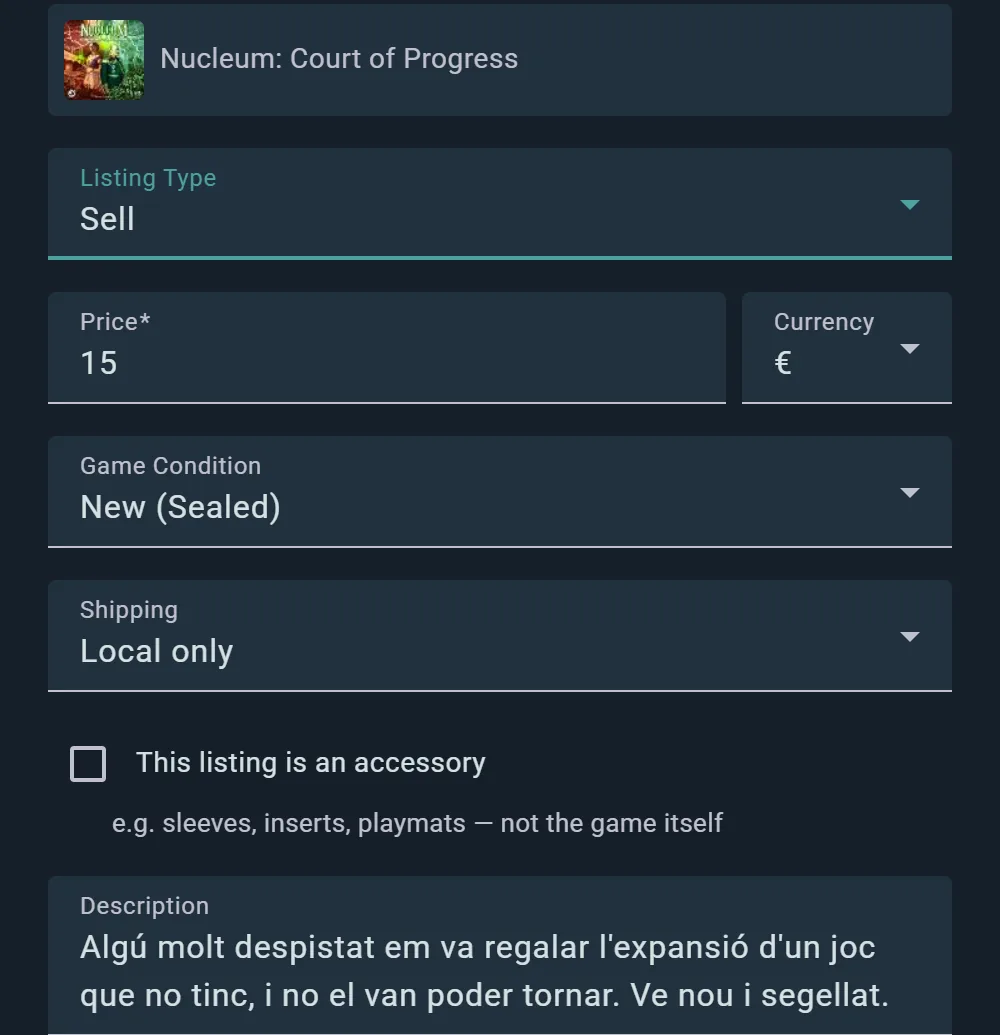
Photos
- Add photos of your actual copy — the box, the contents, and any wear
- Clear photos are the single biggest thing that makes a listing sell
Condition Label
Select the condition that best matches your copy. Ludoya uses five tiers:
- New (Sealed) — New and sealed in its original packaging
- Like New — Opened, but in perfect condition
- Good — Lightly used, with minimal wear
- Fair — Shows signs of use, but complete and playable
- Poor — Heavily used, with significant wear
Be honest about condition. Photos help buyers verify your assessment.
Price & Currency
- Set your asking price, in any of 25 supported currencies
- Price should reflect condition and market rates
Where It Can Go
- Location is required — it's what puts you in other players' distance searches
- Shipping scope: local only, ships nationally, or ships internationally
- Trade preferences: on a trade listing, say what you're hoping to get back
- Accessory type: for sleeves, inserts, playmats, miniatures and the like, pick what it is
- Link: point at a rulebook, a review, or anything else that helps
Description
Write a description that helps buyers understand what they're getting:
- Condition details not obvious from photos ("small tear on corner," "manual has writing")
- Included items ("comes with all original pieces," "includes expansions X and Y")
- What's missing if anything ("no insert," "box missing")
- Special notes ("smoke-free home," "stored in dry climate")
Listing Visibility
Your listing appears:
- On your profile
- On the game's marketplace
- In marketplace search and filter results
Buying a Game
Finding and purchasing games from other players is simple.
Finding Listings
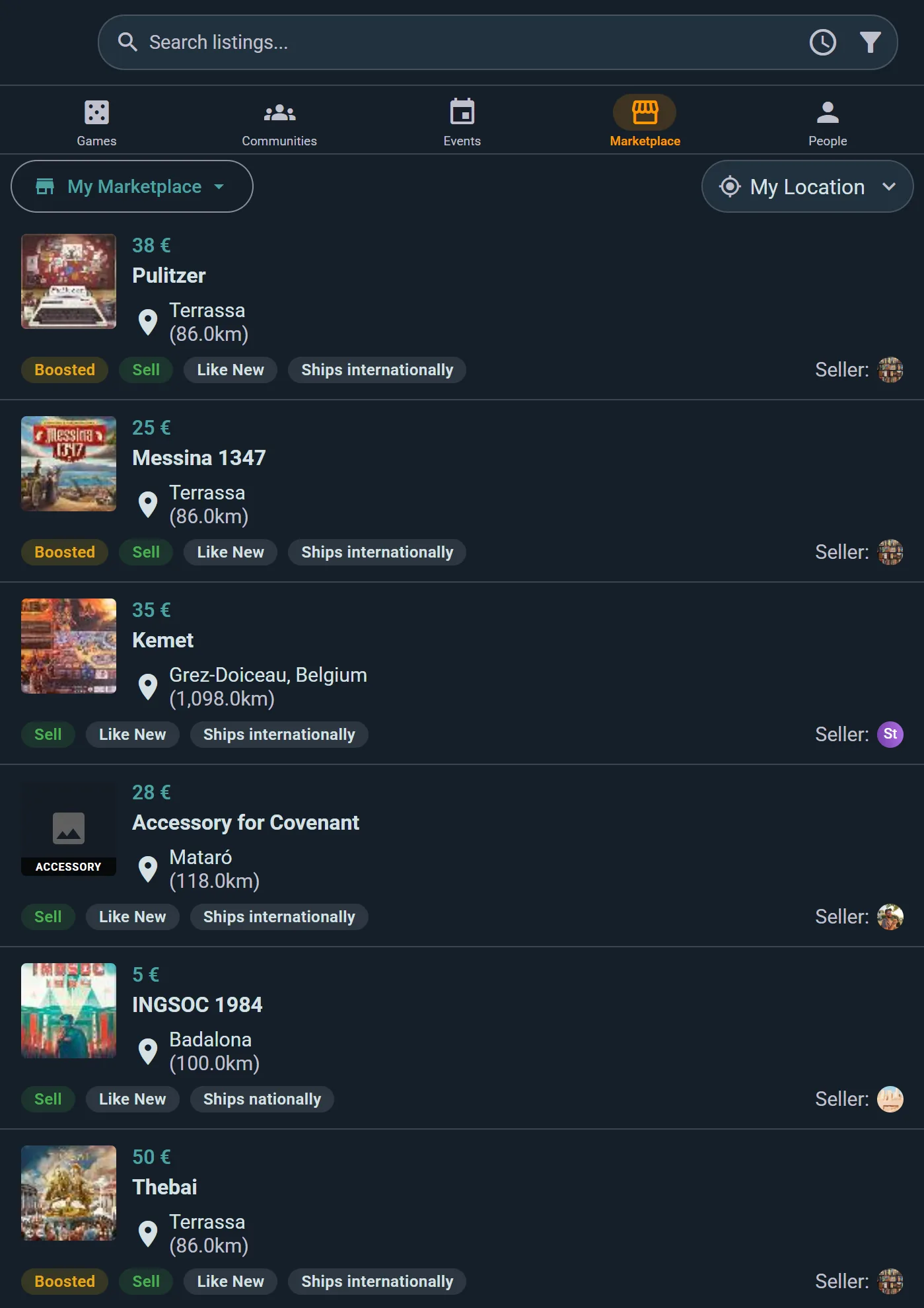
Each row gives you the asking price, how far away the seller is, whether they'll ship or want to meet locally, and the condition — so you can judge a listing without opening it. Boosted listings get a lift in the order.
From a Game Page:
- Click the game's Marketplace widget
- See all active listings for that game
- Apply filters below
From Explore:
- Go to Explore and pick the Marketplace tab
- Browse all games for sale
- Use search and filters to narrow down
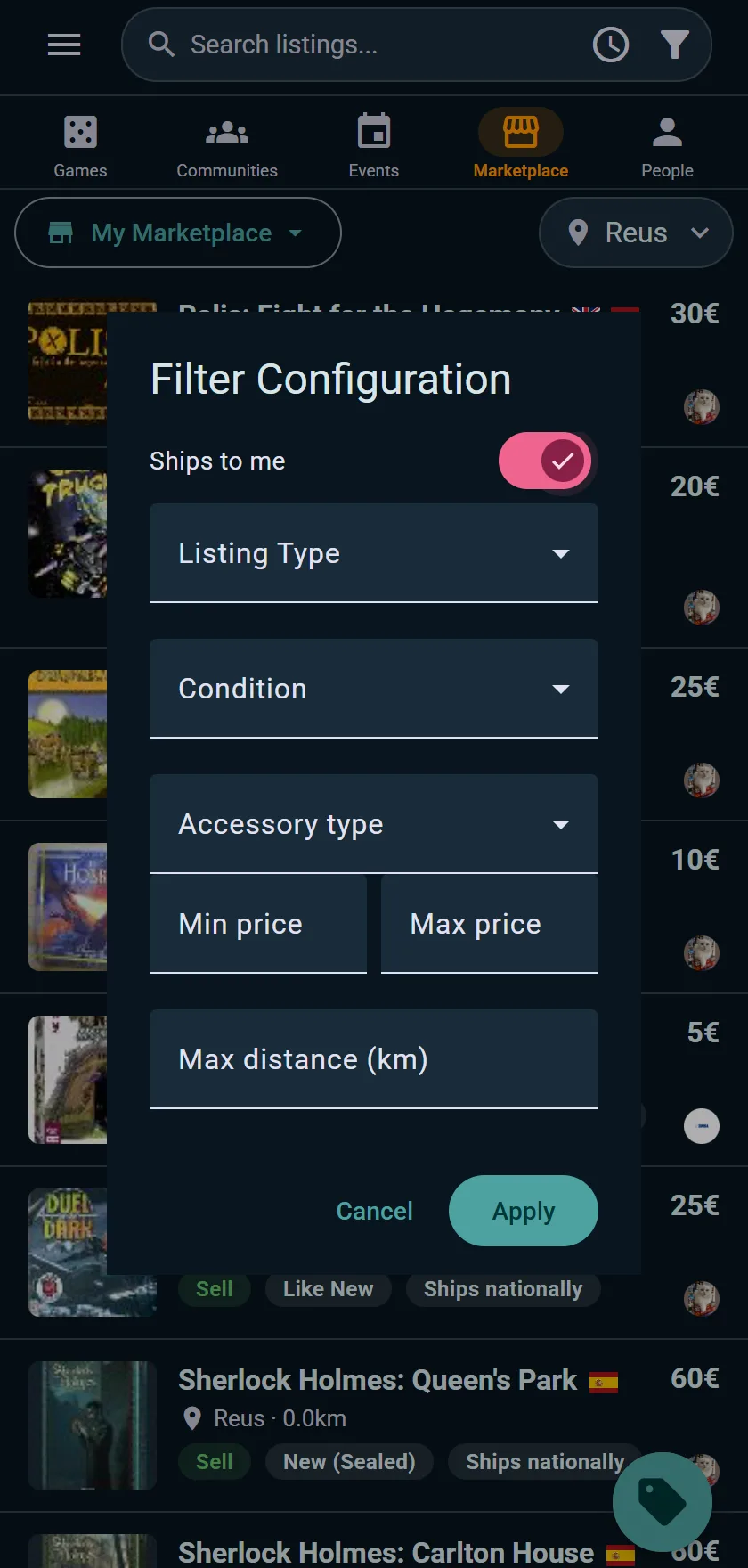
Filtering & Sorting
Filtering Options
- Listing Type — Sell, Trade, Sell or Trade, or Wanted (people looking for a game rather than offering one)
- Condition — pick one tier, or Any
- Price Range — set min and max to match your budget
- Ships to me — hide sellers who won't post to your country
- Distance in km — show only sellers near you, for local pickup
Sorting Options
Sort results by what matters to you:
- Newest — Latest listings first
- Price: Low to High — Find the cheapest deals
- Price: High to Low — See premium copies first
- Distance — Closest sellers first (reduces shipping costs)
- Alphabetical — A to Z by game title
Combining filters and sorts helps you find exactly what you're looking for.
Viewing a Listing
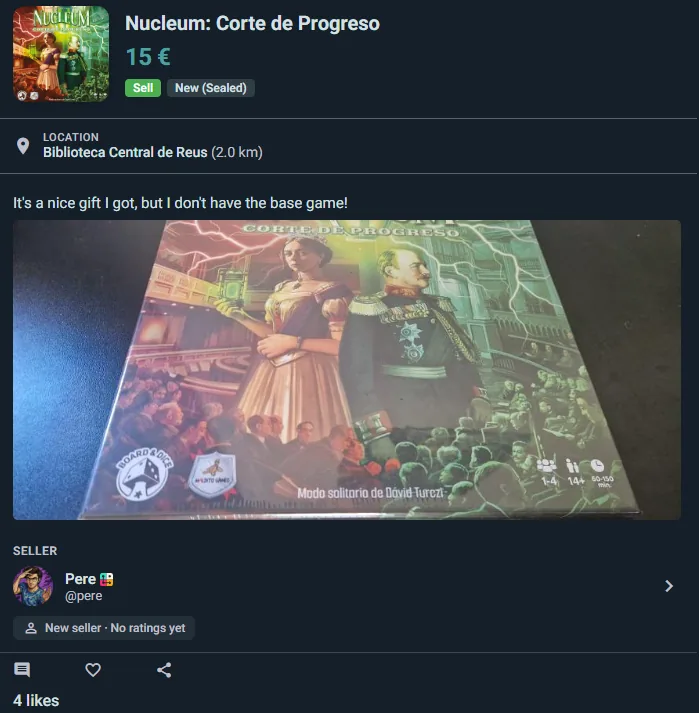
Click any listing to see:
- Game details — Which version/edition they're selling
- Condition details — Exactly what the seller described
- All photos — Full view of the game's condition
- Seller profile — Their name, rating, and review count
Looking for a Game
Can't find the game you want for sale? Say you're looking for it, and let the people who have it come to you.
- On the game's page, open its prices and tap Look for it. Or, anywhere, open the menu next to Sell Game and pick Look for a Game
- Choose the game (it's picked for you on its page). Pick a version only if you want that edition or language, and add more games if you're after several
- Add a note: the edition or language you want, how you'd pay, when and where you could meet
- Say where it can come from: local only, or sent to you from within the country or from abroad
- Leave Add it to my wishlist too ticked to be told as soon as someone lists a copy for sale
A want-ad has no price and no condition, since you don't have the game yet. It shows in the marketplace with a pink Wanted label, and anyone can list them with the Listing Type filter. If you own a game somebody is looking for, its page tells you: a pink looking for it chip next to the price opens their want-ads. On the game's prices page they have a section of their own, People looking for it, below the copies for sale.
Someone who has the game taps I have it and tells you about their copy: its condition, their price, how to hand it over. That opens a private conversation, as with any listing. There's no reservation, sale or rating step: once you've found your game, take the listing down from its menu. A want-ad lasts three months, so a game found elsewhere doesn't stay wanted for long; you're warned a week before, and can renew it if you're still looking.
Messaging & Negotiation
Sending an Inquiry
Tap Send Inquiry on a listing and write your opening message. That creates a conversation tied to the listing — from then on the button reads Go to Inquiry, so you always land back in the same thread.
Sellers see every inquiry on their listing under Inquiries (N), so several buyers can be in the running without the conversations getting tangled.
In the Conversation
- Listing context — a card at the top of the thread shows the game, price, and the listing's current status, so neither side has to explain which copy they mean
- Reserve for this buyer — once you've agreed, the seller reserves the listing for that person straight from the chat
Agreeing a Price
Talk the price over in the thread. When you've settled, the seller reserves the listing for you and you arrange handover or postage between yourselves.
Asking Questions
Message the seller about:
- Specific damage ("Is that tear in the rulebook?")
- Missing components ("Do you still have all the tokens?")
- Gameplay wear ("Does the board have any markings?")
- Shipping ("What's the cost to my region?")
Sellers generally respond within a few hours to a day.
Transaction Lifecycle
Once you've agreed to purchase, the transaction progresses through clear stages:
Status Stages
Active
- Listing is live and available to buy
- No buyer yet — anyone can enquire
Reserved
- You've secured the game (payment often pending)
- Seller is holding it for you
- Not available to other buyers
Delivered
- Seller has posted the game (or handed it over in person)
- You're expecting it to arrive
Sold
- You've received the game and confirmed it matches the listing
- The transaction is finalized and both of you can rate each other: the listing asks each of you how it went, with Rate Transaction at the top
Expired or Cancelled
A listing runs for 180 days. You're warned a week before it lapses, and Renew Listing puts it back on the market for another 180. A box that's out on loan waits until it's back: the listing says who has it, with Mark as returned right there. Sellers can cancel a listing at any time. Sold it in person or somewhere else? Mark as sold and pick the buyer, so you can rate each other and the game goes into their collection, or Someone outside Ludoya, which keeps a copy you listed from your shelf as Previously Owned.
Premium members' listings are boosted — they carry a badge, rank as if a little closer, cheaper and newer than they are, and renew themselves instead of expiring while the subscription is active.
Confirming Receipt
Ludoya doesn't handle payment or postage, so there's no tracking number to enter — you and the seller sort that out between you. What matters here is confirming receipt once the game lands, which closes the transaction and unlocks ratings for both sides.
Into the Buyer's Collection
When a sale closes with a buyer on Ludoya, the game goes straight into their collection, with what they paid and who they got it from. Nothing is posted in anyone's feed.
- Listed from the seller's shelf: that very copy moves, keeping its edition and condition. The seller's notes, shelf place and prices stay with the seller, who keeps it in their collection as Previously Owned, with a line added after their notes saying who bought it, for how much and when.
- Listed without a copy: the buyer gets a new copy of the game.
- Sold to someone outside Ludoya: the copy stays with the seller as Previously Owned.
Was it marked sold to the wrong person? The buyer opens the listing and taps Not yours? Send it back: the copy returns to the seller exactly as it was, the listing goes back on the market, and the seller is told.
Trader Reputation Tracking
Ludoya tracks seller behavior to help you decide who to buy from:
Reputation Metrics
- Communication — How quickly and clearly they respond
- Item Accuracy — How well the game matched the listing photos and description
- Punctuality — How fast they posted it or made the handover
- Overall — The average of the three (1–5 stars)
Viewing Reputation
A trader's reputation card shows:
- Overall rating in stars, with the three category averages beneath it
- Total ratings — how many people have rated them
- Total transactions — how many deals they've completed
- New seller — no ratings yet, when someone's just starting out. Everyone begins here, so it's not a red flag on its own
High-rated sellers with many reviews are generally safer bets for smooth transactions.
Leaving Feedback
After a transaction completes:
- You can rate the seller across the three dimensions
- Leave optional comments about your experience
- Your feedback helps other buyers make informed decisions
The seller rates you the same way, so buyers build a reputation too.
Best Practices for Safe Trading
- Inspect photos carefully — Ask for additional angles if unsure
- Ask about condition — Message the seller with specific questions
- Check seller rating — Buy from highly-rated sellers when possible
- Be honest when selling — Accurate descriptions build trust and ensure smooth transactions
- Communicate clearly — Agree on all terms before committing to a purchase
- Confirm receipt — Once the game arrives, confirm it matches the listing so the seller gets credit
Keeping Track
Three pages keep your marketplace life tidy:
- Manage your listings, on your marketplace tab — every listing you've posted, with the interest each has had. Select several to change the price, relist, withdraw, delete or mark them sold at once
- Inquiries — every listing you've asked about, and the questions on yours, in one list
- Liked listings — tap the heart on anything you're keeping an eye on, and find it again here
Ludoya also watches your wishlist for you: when someone lists a game you want, you get a wishlist match notification. Turn it on under Notifications.
Second-Hand Markets at Events
A games day is the best place to sell the boxes you no longer play: the buyers are all in the room. Any event with a place can have a second-hand market. Switch it on in the event editor, and choose how it runs.
Attendees Sell Their Own Games
People coming to the event list the games they're bringing. Sell several games picks them straight from your collection and prices them in one go, with a note on where to find you at the event. Buyers browse the market on the event page, reserve a box with its seller, and pay in person on the day.
These listings are public, tagged with the event, and for local pickup only. They expire two days after the event ends, so the marketplace isn't left full of boxes that already changed hands.
The Organizers Sell Them at a Table
The classic Bring & Buy. Owners hand their boxes to your table; you sell them and pay each owner their share at the end. Ludoya keeps the count.
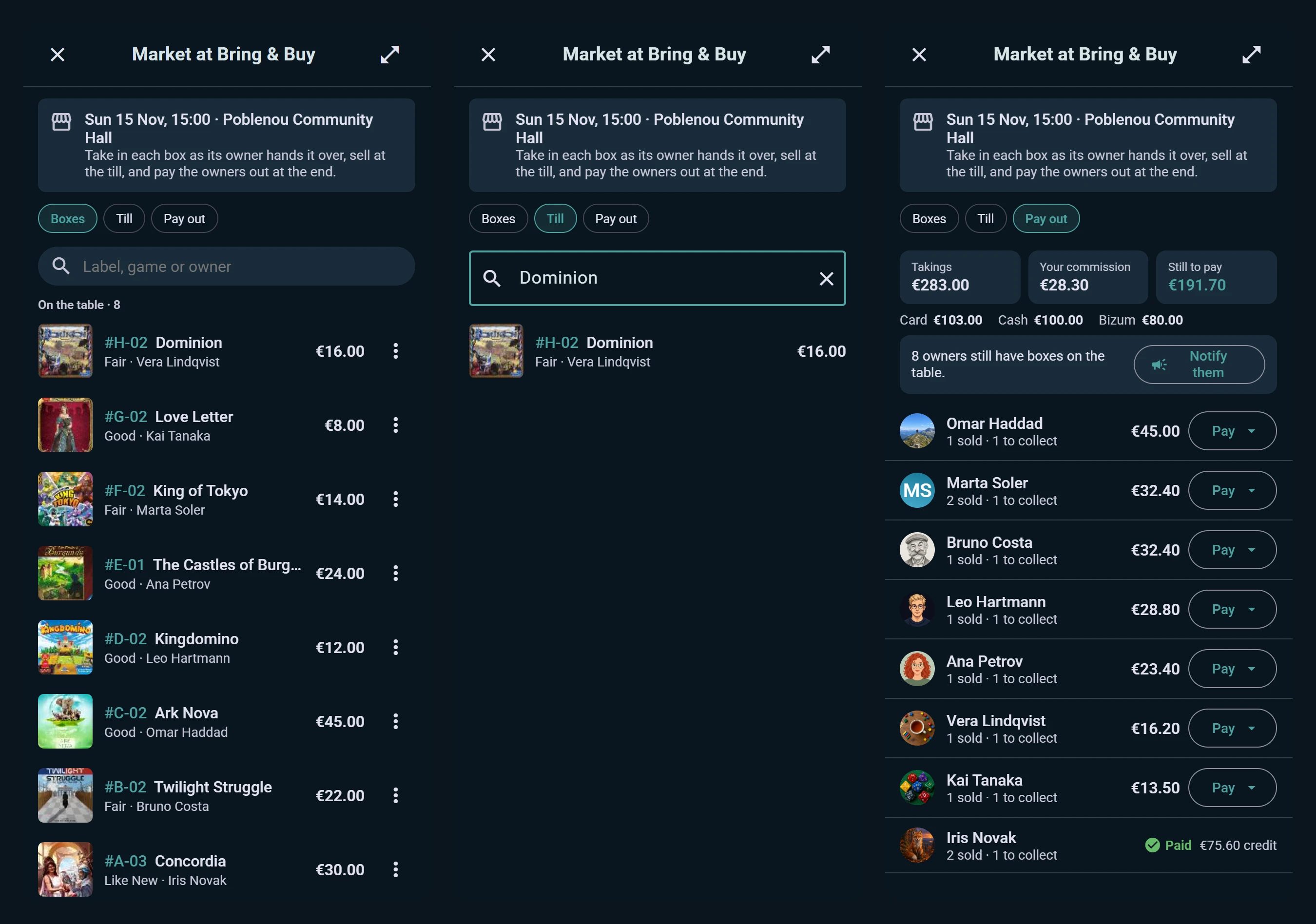
- Boxes. Take in a box as its owner hands it over: who it belongs to, what it is, its condition and price, and a label number to write on it. It goes straight on sale. Owners don't need a Ludoya account; add a contact, seen only by you, to reach them at payout.
- Commission. Set the market's cut once. Any box can have its own, and a donated box can give 100% to the organizers.
- Till. Type the number on a box, or part of its name or its owner's, and sell it, noting how it was paid: cash, card or another method. The till keeps working with no signal: sales wait on the device and go through when the connection is back, and a box sold twice is flagged rather than counted twice.
- Pay out. Takings, your commission and what's still to pay, split by payment method for the end-of-day count. Each owner's line shows what they sold and what they have to collect. Pay them in cash or, if you're a shop, in store credit worth a bonus on top.
- Owners are kept informed. They get a notice when a box sells, and Notify them tells everyone with unsold boxes to come and collect.
Owners see their own boxes on the event page: what's on the table, what sold, and what they're owed.
Organizer-run markets are part of the Business plan.
A Club's Own Market
A club can open a market for its members only. Listings posted to the club are seen by members and stay out of the public marketplace, which suits selling the club's spare copies or trading among regulars. Admins switch it on in the club console's Settings, under Who can post listings to the club, and members find it on the club's page.